Guild icon
EmoTracker
Support / general-support
If your package manager is empty, autotracker isn't working, or you can't update, make sure you have re-downloaded and installed the latest update. See #announcements for details.
Avatar
Lechtansi 2019-02-28 18:53
@Allstin i don't know if you ended up keeping pins or not, but its VERY useful for a few things. its where you can keep track of "seen" items, like library or zora ledge or lumberjack. its also handy if got a hint that you cant clear off yet (like if i get an early mimic cave hint), ill just pin mimic cave to remember to skip it. its also useful for pinning dungeons, because then you can easily scan the # of items you have left
Avatar
Allstin 2019-02-28 19:27
i wouldn’t necessarily be speedrunning so I can see that being helpful @Lechtansi
Avatar
Lechtansi 2019-02-28 19:28
i mean, its useful, speedrunning or not
19:28
i'm a racer and i use it all the time because my memory sucks
Avatar
Allstin 2019-02-28 19:41
It doesn’t slow ya down?
19:41
helps in the long run
Avatar
Lechtansi 2019-02-28 20:51
I’m sure I’m losing some time because I have to track, so I’m excited to play with voice / auto tracking, but I otherwise wouldn’t be able to play (my memory is busted) so I manage
Avatar
Allstin 2019-03-01 16:05
the tracker is a lifesaver
16:05
it would be cool to be able to show the map and stuff onscreen but i feel like im running outta room
Avatar
Lechtansi 2019-03-01 16:11
you mean on stream? Or on the same monitor
Avatar
Allstin 2019-03-01 16:12
stream
16:12
also is there a dungeon tracker
Avatar
Lechtansi 2019-03-01 16:14
lets take this to DMs, ill show you my setup
Avatar
Allstin 2019-03-01 16:15
okay
Avatar
RainingElementalist 2019-03-02 07:16
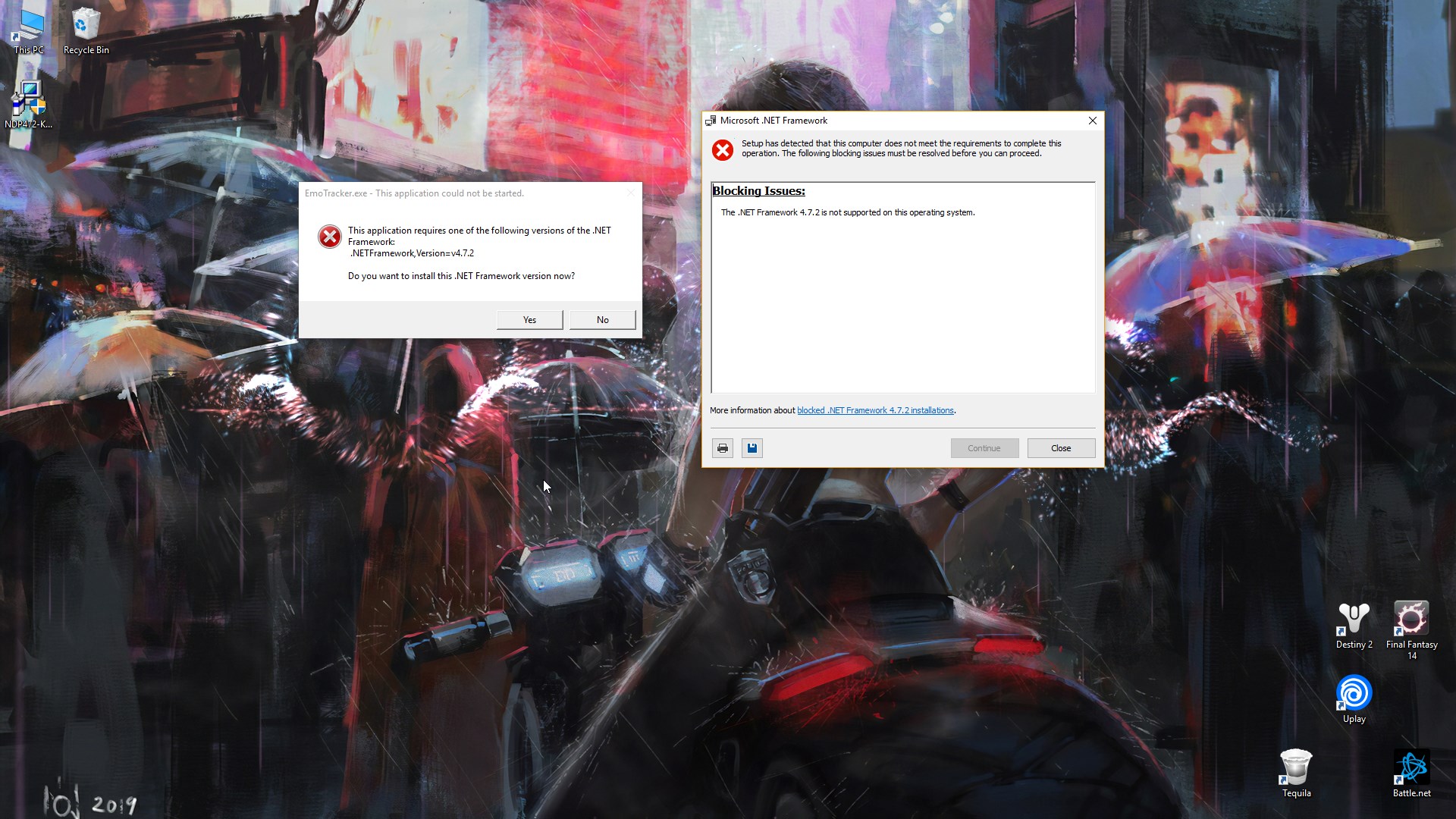
So after updating EmoTracker on thursday, i was unable to open it, and got this
07:17
i'm using a 32bit pc
Avatar
Tekky 2019-03-02 07:18
If I'm not mistaken, EmoTracker requires a 64 bit CPU architecture
07:18
Which also means your computer must be pretty old
Avatar
RainingElementalist 2019-03-02 07:18
it never did before =[
07:18
yea, 32bit and all
Avatar
MetalMachine 2019-03-02 07:19
rip
Avatar
RainingElementalist 2019-03-02 07:20
welp, guess i need a new comp to use this again
Avatar
Kono Tyran 2019-03-02 07:21
Out of curiosity how old is your computer?
Avatar
RainingElementalist 2019-03-02 07:21
Too old lol
07:22
let's see
07:25
OS Name Microsoft Windows 7 Professional Version 6.1.7601 Service Pack 1 Build 7601 Other OS Description Not Available OS Manufacturer Microsoft Corporation System Name FAMILY-PC System Manufacturer Hewlett-Packard System Model HP Compaq dc7900 Convertible Minitower System Type X86-based PC Processor Intel(R) Core(TM)2 Duo CPU E7300 @ 2.66GHz, 2667 Mhz, 2 Core(s), 2 Logical Processor(s) BIOS Version/Date Hewlett-Packard 786G1 v01.08, 8/25/2008 SMBIOS Version 2.5 Windows Directory C:\Windows System Directory C:\Windows\system32 Boot Device \Device\HarddiskVolume1 Locale Japan Hardware Abstraction Layer Version = "6.1.7601.17514" User Name Family-PC\Robert Time Zone Pacific Standard Time Installed Physical Memory (RAM) 4.00 GB Total Physical Memory 3.46 GB Available Physical Memory 1.45 GB Total Virtual Memory 6.95 GB Available Virtual Memory 4.51 GB Page File Space 3.50 GB Page File C:\pagefile.sys
07:26
~ i'm gonna assume 11 years (edited)
Avatar
Kono Tyran 2019-03-02 07:27
That should be a 64bit capable processor
07:28
I think core 2 duo is 64bit capable. So it's not nessesaraly the computer just the OS
Avatar
little_red 2019-03-02 07:29
quick fix for this is to install an older version and just don't update it
Avatar
Kono Tyran 2019-03-02 07:29
blobthis
Avatar
RainingElementalist 2019-03-02 07:29
yea
Avatar
LiminalityCarb 2019-03-02 09:04
I apologize for asking this as I'm sure it has been asked recently but my searching seems to be failing me. Is there a way to persist the height/width that we set the main tracker to across each time we run the application? EG (since I know i am bad at describing things) I open the tracker, use the standard window size adjustments to make it the size/shape I want. Can I persist that across sessions yet?
Avatar
Kono Tyran 2019-03-02 09:41
@LiminalityCarb thid blog post mentions support for this by editing some of the config files https://emotracker.net/blog/2018/09/13/emotracker_2_1_release_notes/
09:42
But by default mine seems to keep the size of what I set.
Avatar
LiminalityCarb 2019-03-02 09:48
thanks. mine keeps resetting to the default size so I'll take a look through that thing you linked to see if it helps
Avatar
Lechtansi 2019-03-02 10:20
You could also set it up as you like it, and then hit file -> save and create a “startup” save that you load each time
Avatar
Sin 2019-03-02 11:14
Is there a way to remove pinned locations or make the map bigger in a package?
Avatar
EmoSaru 2019-03-02 11:15
Yes, through layout overrides. #customization-support please.
Avatar
Sin 2019-03-02 11:16
My bad, just saw that lol. ty
Avatar
Ivanero 2019-03-03 15:55
where is the Twitch icon for chatHud? (edited)
Avatar
MikeTrethewey | Axiom Verge 2019-03-03 15:56
Bottom-right corner of the app window. Not all tracker packs have codes that are easy to use with the ChatHUD interface and the Twitch Integration takes a little bit of setup.
Avatar
Ivanero 2019-03-03 15:57
oh tried with 3-4 packs and is not working with any of them
15:57
oh wait now it works what
Avatar
La vem o clau patati patacola 2019-03-06 17:44
have a 32bits support to emo tracker?
Avatar
EmoSaru 2019-03-06 19:16
No.
19:17
Certain libraries the app needs to make use of are 64 bit only.
Avatar
Ryan G 2019-03-07 20:48
Is it possible to download older version for use on 32bit WIndows?
Avatar
EmoSaru 2019-03-07 20:55
The link was posted in general, so you can find it there. Pack support for that version will eventually degrade to nothing though, so please understand that it’s no longer a supported environment. (edited)
Avatar
akii 2019-03-09 04:53
hello, how can i delete a map from EmoTracker?
Avatar
Cryorus 2019-03-09 05:25
Depends on the Pack, some Packs offer a map less item only version
Avatar
AkuHoS 2019-03-09 23:59
I downloaded EmoTracker, downloaded the Standard Map Tracker, and I was wondering if I need to somehow upload my randomized file to it (edited)
00:00
To change the layout of items and such
00:02
Am I supposed to upload it to the tracker?
00:02
And if so, how?
Avatar
EmoSaru 2019-03-10 00:03
The tracker doesn't show you where the items are
00:03
It just allows you to keep track of what you've found/done
Avatar
AkuHoS 2019-03-10 00:03
Ahhhh, my mistake
00:04
Thanks!
Avatar
EmoSaru 2019-03-10 00:04
Np!
Avatar
AkuHoS 2019-03-10 00:05
Oh I think I understand. When I get an item, the boxes change. Is that showing what I now have access to?
00:05
That was what was confusing me. But I think I get it.
Avatar
ThatChesterGuy 2019-03-10 09:49
Hello, question about Scrubsanity, scrub locations appear to require boomerang to appear green? Is this a bug, or is there something I am missing about scrubs
Avatar
Tekky 2019-03-10 10:05
What pack are you asking about?
Avatar
JRJathome 2019-03-10 10:12
Likely @Hamsda's pack. I believe his is the only one which currently supports scrubsanity.
Avatar
Hamsda 2019-03-10 10:12
they need a way to attack the scrubs
Avatar
ThatChesterGuy 2019-03-10 10:13
Ah, I understand the requirement now, Thank you
Avatar
ThatChesterGuy 2019-03-10 19:09
one more quick question, what does it mean when the tracker says that you can visually check the contents of a chest that is inaccesable?
Avatar
WillardJBradley 2019-03-10 19:10
you can see the item but don't have the required items to get it
Avatar
Natalie 2019-03-10 19:16
you can see or otherwise learn what the item is
19:16
(in the case of games that give hints for specific locations, which is the case for LttPR's pedestal and tablets)
Avatar
ThatChesterGuy 2019-03-10 19:30
oh, i had my gossip stones incorrectly set
19:30
thank you!
Avatar
Matt 2019-03-10 20:55
i think the tracker i was using updated and i cant open my json file, is there anyway to fix this?
Avatar
EmoSaru 2019-03-10 21:19
So, #faq specifically warns about this.
Avatar
Cadenza 2019-03-10 21:37
I seem to be unable to install latest update. Each time I open the tracker, I have the normal prompt to install the update. I follow the step. I tells me the updated installed successfully, then I close the tracker. When I reopen it, I have the prompt again. Any idea what I can do?
21:37
I'm on 2.3.0.6
Avatar
Cadenza 2019-03-10 21:49
forget it. The best option seemed to be uninstall-reinstall
Avatar
EmoSaru 2019-03-10 21:49
That's very strange. Please let me know if uninstall/reinstall fixed it for you.
Avatar
Cadenza 2019-03-10 21:50
hmmm... just after intallation, it showed 2.3.... actual version. Then restarting it revert it to 2.3.0.6...
Avatar
EmoSaru 2019-03-10 21:52
I suspect you have multiple installations of the tracker.
21:52
Make sure you've uninstalled them all, and that you don't have a shortcut e.g. pointing to some other old install location
Avatar
Cadenza 2019-03-10 21:57
yes! I had previously changed the default size of the tracker. Can you remind me where I can go customize that?
Avatar
EmoSaru 2019-03-10 22:02
It's in application_settings.json, in your Documents/EmoTracker directory
22:04
You want to set initial_width and initial_height
Avatar
Cadenza 2019-03-10 22:08
I'm breaking the thing XD What would be the exact text to enter?
22:08
(I'm sorry, I'm a complete ignorant in programming)
Avatar
EmoSaru 2019-03-10 22:09
it'd be easier for you to copy and paste what you have
22:09
That way I can show you the difference
Avatar
Cadenza 2019-03-10 22:09
default is that : { "ndi_frame_rate": 30.0, "always_on_top": false, "discord_rich_presence": false, "enable_voice_control": true, "last_active_package": "alttpr_emotracker_emosaru", "last_active_package_variant": "standard", "package_repositories": [] }
Avatar
EmoSaru 2019-03-10 22:10
{ "initial_width": 800, "initial_height": 600, "ndi_frame_rate": 30.0, "always_on_top": false, "discord_rich_presence": false, "enable_voice_control": true, "last_active_package": "alttpr_emotracker_emosaru", "last_active_package_variant": "standard", "package_repositories": [] }
22:10
It's like that
Avatar
Cadenza 2019-03-10 22:11
right! Comma! Those damned thingy! Thansk a lot!
Avatar
EmoSaru 2019-03-10 22:11
np
Avatar
Minty 2019-03-11 00:24
Hi! Is there any way to make this run on Windows 7/x32? ><
Avatar
EmoSaru 2019-03-11 00:27
32 bit windows is no longer a supported platform for the tracker.
Avatar
JRJathome 2019-03-11 00:28
The current version uses certain libraries not available in 32bit versions of Windows. There's a download link in #general for an old version which should work, but pack support isn't guaranteed.
Avatar
Minty 2019-03-11 00:28
Ah... Shame. Alright.
00:28
Oh, let me try that out.
Avatar
EmoSaru 2019-03-11 00:29
Just to reiterate - support for that version will degrade over time. You will find over time that the latest versions of packs do not work properly, or fail to work at all.
00:29
I strongly recommend migrating to x64 windows if you have a compatible cpu.
Avatar
Minty 2019-03-11 00:30
Yeah, it's a plan for the near future but I have to make do with what I have for now
00:34
Alright, seems to be working for now. Thanks for the support
Avatar
Seraphin Eveles 2019-03-11 02:53
Idk if this has eveer been talked about/requested (or if it's a feture I've overlooked), but a way to save "default" or "Save" runs would be wonderful
02:54
for example, I like to start each LttP run with all of the dungeons pinned, but currently I have to re-pin them every run
02:54
Being able to just "save" a setup with them already pinned would be quite useful
02:54
Also, I've found I can't run Oracle of Seasons in one sitting, and being able to save a current run and come back to it later would be wonderful
Avatar
EmoSaru 2019-03-11 03:01
Have you tried literally saving your setup, using the save command, and then just loading it? Save/load has been supported for a while.
03:01
Your saves are invalidated by a few things - see #faq
Avatar
Seraphin Eveles 2019-03-11 12:18
Ah crap. I knew I overlooked it. Thanks.
Avatar
bombonfun 2019-03-12 10:37
where do i dl the 32bit version?
Avatar
Sal the Dragon 2019-03-12 10:47
I'm not sure you can anymore. Support for it will only degrade over time
Avatar
stephen 2019-03-12 10:51
the latest version just added experimental 32 bit support
Avatar
EmoSaru 2019-03-12 10:55
I can’t guarantee it’s working properly - I have at least one report that it’s not, although I’m able to run it in 32 bit on my machine.
10:56
There’s a maximum amount of effort I’m willing to put into 32 bit though, and if this doesn’t work it’s probably just dead.
Avatar
Nelliel (Shippo) 2019-03-12 14:05
how does the chat hud work i tried looking on the website and it doesnt show anyhting
Avatar
JRJathome 2019-03-12 14:07
There's instructions and commands in #faq
14:07
Item codes are pack dependant. You can check the item jsons for the pack you're using to find the codes.
Avatar
Nelliel (Shippo) 2019-03-12 14:19
i think i got it ill have to play around with it after work
Avatar
Nelliel (Shippo) 2019-03-12 17:17
that chat integration thing is super cool
Avatar
Sal the Dragon 2019-03-12 17:20
Yeah chatHUD is pretty amazing
Avatar
LostThePirate 2019-03-12 21:18
Not sure if this is an EmoTracker thing or a Hamsda's pack thing, but on the latest update, I've found 2 issues. First, clearing all checked in a pinned area (like a dungeon) no longer un-pins it. Second, if you already have something pinned, you can no longer double click it an move it to the top of the pins list.
Avatar
EmoSaru 2019-03-13 01:55
Make sure you’re running the actual latest update. The clearing issue was fixed. I will look into the other one as I haven’t checked it.
01:56
Or at least the clearing thing should be. Are you right clicking on the map to clear, or just manually clicking each thing until it’s empty? (edited)
Avatar
EmoSaru 2019-03-13 02:15
Both of these issues should now be fixed in version 2.3.2.4.
Avatar
Tekky 2019-03-13 02:26
"auto_unpin_on_clear" still exists, right? (edited)
Avatar
EmoSaru 2019-03-13 02:34
Yes, why?
Avatar
LostThePirate 2019-03-13 02:39
Ah, my bad, was on 2.3.2.3. I updated yesterday, I guess a new one got pushed while I was running a seed this evening?
02:40
And I never right click in the map. I either long-press the square and manually clear within, or (more often than not) I clear from the Pinned Locations tray.
02:41
(I'm one of those weird Pins power-users, because I have memory issues.)
Avatar
EmoSaru 2019-03-13 02:43
The version with the fixes for your issues literally got pushed a few minutes ago after I looked into your report. You didn’t miss anything. (edited)
Avatar
LostThePirate 2019-03-13 02:46
Ah, ok. Thanks for addressing this so quickly! :)
Avatar
Destroyer X 2019-03-13 09:25
• Issue: While EmoTracker will load the three Packages I have installed, the moment I press [F2] to launch Broadcast View, the program will immediately close • EmoTracker Version: 2.3.2.4 • Processor: AMD Ryzen 7 2700X Eight-Core Processor 4.20 GHz • Installed RAM: 16.0 GB • System type: 64-bit operating system, x64-based processor • Edition: Windows 10 Home • Version: 1809 • Installed on: 10/3/2018 • OS build: 17763.379 • Troubleshooting Step 001: Installed all of the latest updates of the Packages • Troubleshooting Step 002: Installed the latest version of EmoTracker • Troubleshooting Step 003: Power cycled my Windows 10 computer • Troubleshooting Step 004: Launched EmoTracker prior to launching other programs to see if the issue occurs prior to launching other programs • Troubleshooting Step 005: Disabled Webroot SecureAnywhere I don't know if there's anything else I should try or if there are any other settings I should look at, but I cannot launch Broadcast View. (edited)
Avatar
Destroyer X 2019-03-13 09:38
I did omit a troubleshooting step. I did uninstall and reinstall EmoTracker.
Avatar
EmoSaru 2019-03-13 09:38
Cam you please check the windows event viewer to see if there is any additional information about the crash available? If so, please DM me any information information that’s there. Depending on the nature of the crash, you may see an entry about EmoTracker, and then one about the .net framework - I would want both.
Avatar
Destroyer X 2019-03-13 09:39
I am pulling up the information now.
Avatar
Destroyer X 2019-03-13 09:47
The information has been sent, as requested.
Avatar
Nelliel (Shippo) 2019-03-13 10:20
is it possible to use the hud tracker commands to set a crystal as red crystal or pendant as green pendant
10:20
oh wait
10:20
i figured out the command for green pendant but what about red crstal?
Avatar
little_red 2019-03-13 10:21
crystal56
Avatar
Nelliel (Shippo) 2019-03-13 10:22
ty
Avatar
little_red 2019-03-13 10:22
np
Avatar
EmoSaru 2019-03-13 10:59
@Destroyer X 's issue has been resolved, and I will be including the necessary deployment changes in future versions.
destro22Helmet1 1
Avatar
VenCorbin 2019-03-13 14:08
@Destroyer X i am having that error as well currently. could you possibly pass along the information for the fix to broadcast view, please and thank you.
Avatar
Ninban 2019-03-13 14:13
You should read the message just above yours 😛
Avatar
VenCorbin 2019-03-13 14:14
the one where it says " I will be including the necessary deployment changes in future versions."
Avatar
Natalie 2019-03-13 14:14
the one where no information on actually fixing the problem has been provided?
Avatar
VenCorbin 2019-03-13 14:14
because i read that, i was attempting to see what the changes were incase it was something i can do now.
Avatar
Natalie 2019-03-13 14:14
you should read the message yourself 🤔
Avatar
Ninban 2019-03-13 14:15
oh i just interpreted as "changes will be done in new version"
Avatar
Natalie 2019-03-13 14:15
I read that as "something wasn't being deployed that it turned out it needed, I'll fix that for new versions"
Avatar
EmoSaru 2019-03-14 00:14
It’s actually a bit different. Some systems appear to be handling DLL search paths differently. I rearranged things to a version that works on those systems.
00:15
The fixes were released within a few hours after that message. (edited)
Avatar
A System of Vibrant Colors 2019-03-15 06:22
Are there really updates everyday or is my emotracker going insane?
Avatar
stephen 2019-03-15 06:29
There have been a lot of minor updates recently
Avatar
JRJathome 2019-03-15 08:35
Emo usually doesn't update quite so often, but there's been numerous crash reports lately, which she's been working to fix.
Avatar
EmoSaru 2019-03-15 10:04
The period after a significant feature release is also always busier with updates - several new issues were introduced with the addition of undo that needed to be addressed.
Avatar
Mina 2019-03-15 22:35
how do you enable the chat hud twitch integration?
Avatar
EmoSaru 2019-03-15 22:41
There are directions in #faq
Avatar
Mina 2019-03-15 22:43
Thank you
Avatar
Niriw 2019-03-16 21:20
hello I have a problem I downloaded the MM tracker and I get this error: value cannot be null. parameter name : streamer
21:20
I tried redownloading
Avatar
EmoSaru 2019-03-16 21:22
When does this error occur?
21:23
Also, which MM pack are you using?
Avatar
Niriw 2019-03-16 21:23
Cog > Packages > Installed Packages > MM Randomizer Map Tracker
21:23
the one by Rikkukun
Avatar
EmoSaru 2019-03-16 21:24
Which variant are you using?
21:24
That package has 3
21:24
And at what point does the error occur?
Avatar
Niriw 2019-03-16 21:24
it should be the latest one? 2.1.2
21:24
and as soon as I select the package
Avatar
EmoSaru 2019-03-16 21:25
That package has "Map Tracker", "Standard", and "Minimal"
Avatar
Niriw 2019-03-16 21:25
oh that
Avatar
EmoSaru 2019-03-16 21:26
I am unable to reproduce that error with any of those three.
Avatar
Niriw 2019-03-16 21:26
ok then that might be my issue, I only see one package and I don't see how to switch between them
Avatar
EmoSaru 2019-03-16 21:26
What version of the tracker app are you running (in the title bar)?
Avatar
Niriw 2019-03-16 21:27
v28
Avatar
EmoSaru 2019-03-16 21:27
That is not a tracker version number
21:27
21:28
The version number in the title bar there (edited)
21:28
2.3.2.6 is the latest version
Avatar
Natalie 2019-03-16 21:28
v28 shouldn't even come close to a Majora's Mask package version number or a MM rando version number
Avatar
Niriw 2019-03-16 21:28
alright, let me try downloading again
Avatar
Natalie 2019-03-16 21:28
where did you even get that number 🤔
Avatar
Niriw 2019-03-16 21:44
ok it works now
21:44
thanks for the help
21:45
apparently my emotracker version fell behind on updates
21:45
and I didn't realize
21:45
thanks
Avatar
EmoSaru 2019-03-16 21:58
👍
Avatar
Life4Nintendo 2019-03-17 12:24
I downloaded the latest update and now Emotracker won't open anymore, even after restarting my PC and reinstalling.
Avatar
EmoSaru 2019-03-17 12:26
What version of Windows are you running? Can you check the windows event viewer to see if you have any crash logs?
Avatar
Life4Nintendo 2019-03-17 12:34
I'm running Windows 8.1 and here's the error
Avatar
EmoSaru 2019-03-17 12:36
Can you verify in add/remove programs which version of EmoTracker you have installed? Make sure it says 2.3.2.6
Avatar
Life4Nintendo 2019-03-17 12:37
Avatar
EmoSaru 2019-03-17 12:38
Okay. Can you please check your EmoTracker install directory? I want to see the list of files in the main install directory, but also the x86 and x64 subdirectories
Avatar
Life4Nintendo 2019-03-17 12:44
Here's the main
12:45
x64
Avatar
EmoSaru 2019-03-17 12:45
Okay. Are you on 32 bit windows, or 64?
Avatar
Life4Nintendo 2019-03-17 12:46
and x86
12:46
12:47
64 bit
Avatar
EmoSaru 2019-03-17 12:47
Okay, can you please try copying lua53.dll from the x64 directory into the main directory, and launching again?
Avatar
Life4Nintendo 2019-03-17 12:49
Yup, that did it. Thank you kffcLove
Avatar
EmoSaru 2019-03-17 12:50
Okay, that's very strange, as it would appear that Windows 8.1 is failing on an API that both Windows 7 and Windows 10 support
12:50
What is your EmoTracker install path?
12:51
Also, can you do me one favor? Delete that copied file, and try setting EmoTracker to run in compatibility mode for Windows 7 and seeing if that works?
Avatar
Life4Nintendo 2019-03-17 12:51
Install path is C:/Program Files (x86)
Avatar
EmoSaru 2019-03-17 12:52
kk, nothing weird there then
12:52
Please try the compatibility mode thing, because otherwise this is VERY VERY VERY confusing
Avatar
Life4Nintendo 2019-03-17 12:56
Tried it, same error
Avatar
EmoSaru 2019-03-17 12:56
Fascinating. Okay, you're obviously welcome to run with that fix, though you will need to make it again after each update you install
12:57
I'm going to have to get ahold of a Windows 8.1 setup to try and debug this, but I'm slightly disinclined to do so since Windows 8 is basically dead
13:00
One other question - did you try running EmoTracker as administrator?
Avatar
Life4Nintendo 2019-03-17 13:03
I tried admin
Avatar
EmoSaru 2019-03-17 13:13
Cool, thanks
Avatar
NemoOceansoul (Yuki Virtanen) 2019-03-17 15:55
hmm trying to get the twitch chat hud working and i know i input the name of my twitch channel in the correct line, but whenever i go to the twitch channel to test a command nothing happens. (yes the tracker is up and the twitch chat hud is enabled) help?
Avatar
little_red 2019-03-17 16:11
do you have permission to use the chathud commands? @NemoOceansoul (Yuki Virtanen)
Avatar
NemoOceansoul (Yuki Virtanen) 2019-03-17 16:11
uh im doing it in my own twitch channel so uh? (edited)
16:12
im fairly certain i do
Avatar
little_red 2019-03-17 16:12
you might have to set the permissions first
Avatar
NemoOceansoul (Yuki Virtanen) 2019-03-17 16:12
in the .json or through !hud?
Avatar
little_red 2019-03-17 16:12
not sure
Avatar
NemoOceansoul (Yuki Virtanen) 2019-03-17 16:13
according to faq me and my channel moderators should be able to use the commands automatically
Avatar
little_red 2019-03-17 16:14
i just read that part
Avatar
MikeTrethewey | Axiom Verge 2019-03-17 16:14
You've got the auth set up correctly?
16:15
Which pack are you using? Have you allowed EmoTracker to access the internet without restriction?
16:15
I don't remember if it asks for network permissions again when you set up the Twitch integration.
16:16
Running EmoTracker as admin may also make a difference.
Avatar
NemoOceansoul (Yuki Virtanen) 2019-03-17 16:16
im currrently using the official alltpr tracker for emotracker. i dont believe it asked again but i had already given it full permissions
16:17
will try to run it as admin 1 sec
Avatar
MikeTrethewey | Axiom Verge 2019-03-17 16:17
Next up: Is the Twitch icon on the bottom edge of the app something other than white in color?
Avatar
NemoOceansoul (Yuki Virtanen) 2019-03-17 16:17
its green
16:18
and a user in the chat named emotracker is there =p
Avatar
MikeTrethewey | Axiom Verge 2019-03-17 16:18
Heh, I never actually noticed that, neat.
16:18
Something like !hud mirror doesn't do the thing?
Avatar
NemoOceansoul (Yuki Virtanen) 2019-03-17 16:19
nope. niether does !hud reset
Avatar
MikeTrethewey | Axiom Verge 2019-03-17 16:19
Let's see if after updating all the things if I can get it to cooperate over here.
Avatar
NemoOceansoul (Yuki Virtanen) 2019-03-17 16:21
unless.. under announcements... it says "unfortunately announcing that I am force disabling the auto-tracker for ALTTPR" would the !hud thing be a part of the auto-tracker?
Avatar
Natalie 2019-03-17 16:21
If the fake user is connecting properly to the channel, then it should be able to read and react to commands
16:22
that doesn't have anything to do with autotracking, and we would have heard about it ages ago
Avatar
little_red 2019-03-17 16:22
chathud is not part of autotracking
Avatar
NemoOceansoul (Yuki Virtanen) 2019-03-17 16:22
gotcha
Avatar
MikeTrethewey | Axiom Verge 2019-03-17 16:23
Works On My Machine™. 🤷
Avatar
NemoOceansoul (Yuki Virtanen) 2019-03-17 16:23
huuuh weeird
Avatar
MikeTrethewey | Axiom Verge 2019-03-17 16:23
What OS are you running?
Avatar
NemoOceansoul (Yuki Virtanen) 2019-03-17 16:23
windows 10
Avatar
MikeTrethewey | Axiom Verge 2019-03-17 16:23
Build number?
Avatar
NemoOceansoul (Yuki Virtanen) 2019-03-17 16:23
idk
Avatar
MikeTrethewey | Axiom Verge 2019-03-17 16:23
Run: winver
Avatar
NemoOceansoul (Yuki Virtanen) 2019-03-17 16:25
Avatar
MikeTrethewey | Axiom Verge 2019-03-17 16:25
Yeah, mine's a couple builds behind since I'm bad and can't seem to save all my work. But I imagine that shouldn't be an issue.
Avatar
JRJathome 2019-03-17 16:26
There's been something weird going on with Twitch chat for a while that seems to be affecting chat HUD. We're not entirely sure why it's happening.
Avatar
NemoOceansoul (Yuki Virtanen) 2019-03-17 16:26
oh. okay. so twitch is screwing up not the bot =p gotcha
Avatar
JRJathome 2019-03-17 16:27
Most likely
Avatar
Natalie 2019-03-17 16:27
maybe it's cause twitch bought twitch 🤔 (edited)
Avatar
NemoOceansoul (Yuki Virtanen) 2019-03-17 16:27
amazon bought twitch
16:27
and ithink microsoft owns a good share of amazon...
Avatar
MikeTrethewey | Axiom Verge 2019-03-17 16:28
Conspiracies abound. :p
Avatar
Natalie 2019-03-17 16:28
ah yes, unchecked capitalism
Avatar
NemoOceansoul (Yuki Virtanen) 2019-03-17 16:28
thats my theory why switch cant stream to twitch
Avatar
MikeTrethewey | Axiom Verge 2019-03-17 16:29
Thanks JRJ for that insight. Sounds like that.
Avatar
NemoOceansoul (Yuki Virtanen) 2019-03-17 16:29
yes. thanks. i guess ill keep an eye out for the fix eventually
Avatar
EmoSaru 2019-03-17 18:05
It's bizarre.
18:06
ChatHUD breaks completely randomly.
18:06
It's not consistent between users, or even between sessions with the same user.
18:06
It is, frankly, bizarre.
18:07
I'm continuing to monitor changes on the Twitch integration library I use to see if anybody else ever runs into anything, but it's a big ol' 🤷 right now.
18:07
Thanks Twitch, I hate it.
Avatar
stephen 2019-03-17 19:11
am i crazy or is f5 not undo?
Avatar
EmoSaru 2019-03-17 19:12
In what world has F5 ever been undo?
19:12
F5 resets/refreshes the tracker
19:12
CTRL-Z is undo on Windows
Avatar
stephen 2019-03-17 19:12
derp
19:13
and i presume that is not undoable (edited)
19:13
i'm learning so much today
Avatar
EmoSaru 2019-03-17 19:14
Definitely not undoable, and in fact, clears the undo stack
Avatar
stephen 2019-03-17 19:14
yep! today i learned.
Avatar
Natalie 2019-03-17 19:18
Undo has been canonically Ctrl+Z for an incredibly long time.
19:19
F5 has been "refresh" for a long, long time too. Probably not as long as Ctrl+Z.
Avatar
stephen 2019-03-17 19:19
i am aware. for some reason in trying to learn this software very quickly, i thought I read that undo was f5 which i thought was strange
19:19
clearly my reading comprehension is low.
Avatar
Natalie 2019-03-17 19:19
Incidentally, is Ctrl+Z the current binding for undo in EmoTracker? I haven't actually restarted my tower in a while, so the latest updates haven't taken fully.
19:20
That'll really upset some keyboard players. >.>
Avatar
EmoSaru 2019-03-17 19:21
yes, it is
Avatar
Rockman 2019-03-18 10:53
hi, is there a way to have an overworld glitches keysanity tracker ?
Avatar
EmoSaru 2019-03-18 11:02
This is a better question for #pack-support, but the answer is, “yes if somebody makes it”
Avatar
Charlie 2019-03-18 12:11
My tracker keeps crashing when switching to certain packs. I've tried uninstalling multiple times and the issue still persists.
Avatar
Natalie 2019-03-18 12:14
Is it a fresh install of the packs in question?
Avatar
Charlie 2019-03-18 12:14
I've tried reinstalling the packages if that answers your question
Avatar
Natalie 2019-03-18 12:16
Has there been any customization on your end (e.g. overrides) of the affected packs, or have you never been able to use the affected packs at all?
Avatar
JRJathome 2019-03-18 12:16
Which packs are giving you troubles?
Avatar
Charlie 2019-03-18 12:17
Specifically the PUGhud for oot has yet to work and then a various few have gone back and forth. I haven't done any customization
Avatar
JRJathome 2019-03-18 12:18
Can confirm a crash on my end with the PUGhud pack
12:18
Could something have been messed up with the legacy layout? 🤔
Avatar
EmoSaru 2019-03-18 12:19
Looking.
12:19
JR, what tracker version are you running?
Avatar
JRJathome 2019-03-18 12:20
I just installed the latest update today. I'm on 2.3.2.6
12:21
Ok, my LADX pack is crashing as well. It also has a legacy layout.
Avatar
EmoSaru 2019-03-18 12:21
It's not legacy layout related. One second, I'm looking into it.
Avatar
JRJathome 2019-03-18 12:29
Not sure if this is related, but consumable and static items don't seem to be loading either.
Avatar
EmoSaru 2019-03-18 12:30
What pack
Avatar
JRJathome 2019-03-18 12:30
Yours
Avatar
EmoSaru 2019-03-18 12:30
Specifically when switching from another pack, or on startup?
Avatar
JRJathome 2019-03-18 12:30
Both
12:31
12:32
They seem to be loading fine in Hamsda's pack though
Avatar
EmoSaru 2019-03-18 12:32
Have you done anything but image overrides? Because on 2.3.2.6, this is what I see...
Avatar
JRJathome 2019-03-18 12:33
Ah, thanks. I forgot about that override again. Sorry about that.
Avatar
EmoSaru 2019-03-18 12:33
No problem, just sanity checking.
Avatar
JRJathome 2019-03-18 12:35
Ah, I found my issue. I didn't realize you had split off the keys and labels into new items jsons, so my init.lua override wasn't loading them.
Avatar
EmoSaru 2019-03-18 12:37
I've just released 2.3.2.7, which should resolve the crashes.
Avatar
JRJathome 2019-03-18 12:40
Thanks, Emo
Avatar
EmoSaru 2019-03-18 12:41
np
12:43
@Charlie tagging you just in case you left before this was resolved. Updating to the latest version should fix you - apologies for the issue.
Avatar
CascadeHope 2019-03-18 16:36
My friend noticed something regarding the tracker earlier today... When the program is not in use, the CPU usage shows as 0%... However, just moving the mouse around on the window (not even clicking anything) jumps it up to 5% without map or 11% with map.
Avatar
EmoSaru 2019-03-18 16:46
EmoSaru Today at 11:09 AM As SourLyme said, this is not really the place for it. That said, this is hit-testing, and you can observe a similar increase in the CPU usage of most relatively complex Windows programs while moving the mouse over an application window that accepts/processes mouse input. While the mouse is not moving, or not over the Window, you will notice that the CPU usage is effectively zero (assuming NDI is not active).
Avatar
Sal the Dragon 2019-03-18 17:08
^
Avatar
Darkangel93x 2019-03-18 19:53
okay, i got emotracker user to show up in my channel, i managed to get the twitch icon into the tracker (which is green now) but the chat hud doesnt take the reset command to begin with, does it matter if i am live for testing purpose? in theory it shouldnt matter
Avatar
Natalie 2019-03-18 19:56
Twitch is having
19:56
problems
19:56
somewhere
19:56
there are issues with ChatHUD and we're pretty sure they're not on our side
Avatar
Sal the Dragon 2019-03-18 20:01
There's a reset command?
Avatar
Darkangel93x 2019-03-18 20:01
yes
20:01
according to faq 😄
20:01
there is
20:01
😛
Avatar
JRJathome 2019-03-18 20:02
The reset command is also restricted to the streamer only. Imagine the chaos if anyone could reset it. 😛
Avatar
Darkangel93x 2019-03-18 20:03
tried it via moderator and broadcaster did login for that with my bot account which is moderator to test if that matters ninasThink
20:04
well ill try it tomorrow its 4am anyway xD shouldnt bothering with that at this time Kappa
20:04
anyway if i dont get it to work tomorrow i may get back to you guys 😃 ty anyway
Avatar
Squall 2019-03-20 08:48
Hi, sorry i got a really noob question, how could i set the required medallion for TR & MM? I got one medallion, but MM appeared in red
08:48
Thanks for support 😃
Avatar
stephen 2019-03-20 08:49
right click on the medallion in the tracker
08:49
it will cycle through MM/TR/BOTH
Avatar
Squall 2019-03-20 08:50
Right, got it! sorry for this bad question x)
08:50
Thanks a lot
Avatar
FiredDionysus 2019-03-20 12:31
Hi all, I recently updated me Emotracker and now my map tracker is super tiny and my pinned locations window is really huge. How can I fix this?
Avatar
JRJathome 2019-03-20 12:34
Click and drag the edge of the window to resize it.
Avatar
FiredDionysus 2019-03-20 12:34
it is fullscreen
12:34
and the map is incredibly tiby
12:34
tiny
12:34
basically unusable
Avatar
JRJathome 2019-03-20 12:35
Could you post a screenshot please?
Avatar
FiredDionysus 2019-03-20 12:35
yeah one sec, its having issues on my laptop and I am on my pc one second
12:36
12:36
vs how it looks on my desktop
12:36
12:37
I didnt update my desktop version yet
12:37
so it still looks normal
Avatar
JRJathome 2019-03-20 12:37
Ah, ok. I was looking at the wrong pack. Hamsda readded a horizontal view, so that's why it's doing that.
Avatar
FiredDionysus 2019-03-20 12:37
is there a way to disable it?
12:37
also, it happens with any pack I try for OOT
12:38
heres another pack
12:38
12:38
Same issue
12:39
I never use pinned locations anyway so if I could just get rid of it that would be amazing
Avatar
JRJathome 2019-03-20 12:40
So the reason the pinned items location is so big is because it matches the height of the items to the left. Just getting rid of the pinned locations wouldn't do anything, but if you made an override and moved the items to the top left, with the pinned locations under it, that would fix it.
Avatar
FiredDionysus 2019-03-20 12:41
how would I go about doing that?
Avatar
Hamsda 2019-03-20 12:44
if you do an override for tracker.json you can just remove the entire tracker_horizontal part of it to get the previous behavior
Avatar
FiredDionysus 2019-03-20 12:44
thanks @Hamsda Love the tracker btw moon2CUTE thanks for your help as well @JRJathome moon2CUTE
Avatar
Hamsda 2019-03-20 12:45
sadly there is no "one layout fits all for this" because of how different it will get squeezed and squished depending on resolution and how exactly you size your window
12:45
but thats what overrides are for I guess
Avatar
FiredDionysus 2019-03-20 12:45
yeah thats true, totally understandable
Avatar
Hamsda 2019-03-20 12:45
like I personally have an override for my own pack LuL because it works for me but it probably would be garbage for many others

Avatar
FiredDionysus 2019-03-20 12:46
where would I find tracker.json?
12:46
packs?
Avatar
Hamsda 2019-03-20 12:46
use the in app menu
Avatar
FiredDionysus 2019-03-20 12:46
ah, found it
12:47
how far down on the tracker_horizontal should I delete?
Avatar
Hamsda 2019-03-20 12:47
get rid of the entire thing
Avatar
FiredDionysus 2019-03-20 12:48
so, from the top where I see tracker_horizontal all the way to the bottom of the page?
Avatar
Hamsda 2019-03-20 12:48
like everything in the {} behind it yeah
12:48
just one last } should be at the end
Avatar
FiredDionysus 2019-03-20 12:48
ah gotcha
Avatar
JRJathome 2019-03-20 12:48
And get rid of the comma at the end of the previous section, since that now should be the last section.
Avatar
Hamsda 2019-03-20 12:49
trailing commas shouldnt bother it I think, but yeah
12:49
hmm I guess I could provide some overrides inside the pack that people might find useful rooThink
12:49
so they just have to drag and drop them
Avatar
FiredDionysus 2019-03-20 12:49
yay that worked
12:49
thank you guys again
Avatar
Hamsda 2019-03-20 12:49
👍
Avatar
JRJathome 2019-03-20 12:50
Oh yeah, I guess the comma didn't matter in that case. Sometimes it does though. ¯\_(ツ)_/¯
Avatar
FiredDionysus 2019-03-20 12:51
yeah better safe than sorry
12:51
have a good day boys moon2SH
Avatar
Hevnsaria 2019-03-21 11:02
Good afternoon. I just updated emotracker and now none of my saves work. Is there a way to revert the version?
Avatar
Sal the Dragon 2019-03-21 11:03
If you have save files and you update EmoTracker, they're gone. I'd definitely recommend finishing the rando before updating EmoTracker
Avatar
Hamsda 2019-03-21 11:05
if you mean you updated a pack, then you might find the packs hosted somewhere so you can grab the old version and reload your save
Avatar
Hevnsaria 2019-03-21 11:06
I ended updating both emotracker and the pack since i had hoped it would fix the giant map. I couldnt see my pinned locations
11:07
I'll just make a new seed. Thanks for responding 😄
Avatar
Natalie 2019-03-21 11:17
Could also try completing seeds in one sitting 🤷
11:18
But that's sandblasting the soup cracker
Avatar
Hevnsaria 2019-03-21 11:25
I hear ya. this seed was my first 100 GS so it was taking a bit longer than usual
Avatar
EmoSaru 2019-03-21 11:27
Always finish seeds before updating. If you hand edit your save files to update the versions, it is possible to make them work, depending on what changes the pack author made, but I provide no support for doing such things.
Avatar
Stylesetter 2019-03-21 15:32
Sorry if this is the wrong place to ask, but my EmoTracker doesnt show me Misery Mire with a green tile allthough i have all required items to enter it. Had to check the spoiler log of my rom to realize that misery mire is the next place i gotta go. Is there any reason why EmoTracker doesnt show it to me? (edited)
Avatar
fylion 2019-03-21 15:40
Have you marked the medallion required to enter Mire?
15:41
Right-click on the medallion to toggle between MM/TR/Both
Avatar
Natalie 2019-03-21 16:02
The tracker doesn't know what medallion lets you in until you tell it which medallion lets you in.
Avatar
Stylesetter 2019-03-21 16:10
@Natalie @fylion yeah i marked the medaillion to MM and then the tracker showed me the green square. Thank you for your quick replies! (edited)
Avatar
Deleted User 2019-03-21 17:26
Hi everyone, I tried deleting the horizontal tracker in the overides and the tracker blacks out. AM i deleing to much to fix that map issue?
17:27
i deleted the whole section after tracker_horizontal
Avatar
Natalie 2019-03-21 17:28
There are symbols in JSON that tell where data is separated and grouped.
17:29
You deleted one of them (causing, say, a missing close paren in a sentence
Avatar
Deleted User 2019-03-21 17:31
kk ill keep tinkering with it. Thank you
Avatar
Deleted User 2019-03-21 17:40
got it thank you very much
Avatar
Rockman 2019-03-22 05:00
hi, i can't use auto tracker, i don't have the robot face at bottom right
05:01
i updated everything
05:01
and i used the connector.lua
Avatar
stephen 2019-03-22 05:17
#autotracker-support
Avatar
Alysstrasza 2019-03-23 15:05
Is there a way to make the map bigger?
Avatar
Alysstrasza 2019-03-23 15:16
I can't click on any of the boxes for the tracker.
Avatar
EmoSaru 2019-03-23 15:17
What pack are you using? Can you provide a screenshot?
Avatar
Alysstrasza 2019-03-23 15:22
Ocarina of Time (Hamsda's)
Avatar
EmoSaru 2019-03-23 15:24
I believe @Hamsda has provided help for customizing this layout a few times. I recommend reading through the history of #customization-support, and tagging him there if you can't figure it out. (edited)
Avatar
Sal the Dragon 2019-03-23 15:41
That window is awfully wide. Try just clicking on the corner and changing the overall size of the whole thing
Avatar
Alysstrasza 2019-03-23 15:49
hmmm
15:49
that actually somewhat fixed the issue
15:49
and, sorry, forgot to say that i'd been working on that, Saru- wasn't just ignoring you.
15:49
i think i'll move this to customization though, since i now believe i have to
Avatar
Hamsda 2019-03-23 16:05
I kinda regret bringing back the horizontal layout, since it apparently doesnt work for full screen did not expect so many people to full screen their trackers <.<
Avatar
Alysstrasza 2019-03-23 16:07
😂
16:08
Sorry
Avatar
MrScruffNinjaTuna 2019-03-23 16:10
Got a newb question and I'm sorry if it's in FAQ, I just wasn't able to find it. I get an error in the emulator that states "Failed to unpack block" and it desyncs the auto tracker. Is this caused by Windows Defender by chance?
Avatar
Alysstrasza 2019-03-23 16:11
possible fix: EmoSaru (Last Wednesday) FYI, to anybody experiencing the "Failed to parse block" issues on emulators, I'm talking with the right people about it and I think we have a plan for moving forward. It will be a few days though. In the meantime, restarting the autotracker will likely fix you, and restarting both the autotracker and the lua will almost certainly fix you.
Avatar
MrScruffNinjaTuna 2019-03-23 16:12
Oh cool, thanks for that. Rebooting does give a temp fix, just not sure what is causing it to keep bugging out on me.
Avatar
Bored_Banana 2019-03-25 06:27
Apologies if this has been previously discussed (i couldnt find anything in my light search). just wondering if it is possible to enable/disable the map in the tracker without resetting your items/locations, or is the best way just moving the map off screen? Seems to happen no matter which pack im using
Avatar
Natalie 2019-03-25 07:11
Is there a particular reason you have for needing to hide the map? Just a curiosity.
Avatar
JRJathome 2019-03-25 07:33
Switching a pack/variant will always reset the tracker. There's an option in the menu to disable the map without changing the variant, but that seems to also reset the tracker, so I don't think there's a way to do that.
07:35
I'm unsure why you'd need to enable/disable the map in the middle of a run anyway.
Avatar
Bored_Banana 2019-03-25 14:07
It’s mainly just personal preference. Generally I don’t like the map as I like to fingers out my options myself but sometimes (like once in a rando) I get stuck and need to see what is available. I don’t race so it doesn’t really effect anything but if it can’t be done that’s fine
Avatar
codemann8 2019-03-26 09:11
I've got a question, I've noticed in OBS when I have emotracker open on another computer in my house within my network, I can see and select that NDI instance, giving me the impression that I can use emotracker remotely, like from a convenient tablet device by my side. However, upon choosing that remote device, the preview window doesn't show anything. Is this something that is supposed to be working? Or is there additional setup needed to get this to work properly? This would be such a great way to free up valuable real estate on my screen. (edited)
Avatar
Ninban 2019-03-26 09:19
Pretty sure it's just for the broadcast view, so no interaction with the software remotely I think
Avatar
stephen 2019-03-26 09:19
you cannot USE emo tracker remotely
09:19
you can just pull up the broadcast view (if that window is open) remotely
Avatar
codemann8 2019-03-26 09:28
Right, I would have emo and broadcast view on a tablet, and track things in the tablet, but then I'm attempting to view it from OBS on another computer, which it shows blank, is this not what happens for everyone else?
Avatar
stephen 2019-03-26 09:30
define tablet.
Avatar
codemann8 2019-03-26 09:30
Windows 10 pro on it
Avatar
stephen 2019-03-26 09:30
ok. so just a windows 10 computer
09:31
if you have broadcast view open, you should be able to pull it down via the NDI in OBS
09:31
I use it across machines, technically
Avatar
codemann8 2019-03-26 09:31
Both devices have NDI installed, and yes, I select the correct device and broadcast view input, but it's just blank
Avatar
stephen 2019-03-26 09:32
try it on your local machine.
09:32
like, emotracker and obs on same machine
Avatar
codemann8 2019-03-26 09:32
It works that way of course
Avatar
stephen 2019-03-26 09:32
ok. then move on to obviousish troubleshooting, like disabling windows firewall
Avatar
codemann8 2019-03-26 09:32
Yeah, I've done that as well as antivirus, on both (edited)
Avatar
stephen 2019-03-26 09:33
what about the other direction
09:33
OBS on tablet, emotracker on PC
Avatar
codemann8 2019-03-26 09:34
I mean, I'm not about to stream and play games off my tablet
Avatar
stephen 2019-03-26 09:34
no, this is for troubleshooting
09:35
also, i can safely assume the tablet is wifi
09:35
is the PC wifi as well?
Avatar
codemann8 2019-03-26 09:35
PC is hard wired, tablet wireless
Avatar
stephen 2019-03-26 09:36
and they are both on the same network segment i presume, or else the NDI broadcast wouldn't be detected at all.
09:37
the things i would personally do to troubleshoot may not be viable for you. for instance, I would check wireshark/pcap.
Avatar
codemann8 2019-03-26 09:37
Right, the only thing I can think of that's different from a normal setup is that I have an AD and all devices on the network have both my router and my AD as the 2 DNS IPs
Avatar
stephen 2019-03-26 09:37
I can't think of a single reason why that would matter.
09:39
Ok, so NDI sources advertise via bonjour/zeroconf that they are sourcing a stream from an ephemeral tcp/ip port
09:39
if you are seeing the broadcast listed in the NDI plugin, the advertising is working.
09:39
then the viewer and the stream source talk, and transmission begins.
09:40
so assuming that windows firewall is off in both locations, were it me, I would indeed be running wireshark at both the tablet and the desktop to verify end to end packet transport.
Avatar
codemann8 2019-03-26 09:42
Do you think I should be seeing transports at all times or only as soon as I select it in the drop down and the preview (should) show? (edited)
Avatar
stephen 2019-03-26 09:43
I would assume you should always see some traffic
09:43
but tracking something would definitely send video data.
09:43
i've never pcapped an NDI stream.
Avatar
codemann8 2019-03-26 09:45
Yeah I guess I'll have to play with it, I had just assumed this was a feature being worked on and wasn't working yet, but it seems others are working
Avatar
stephen 2019-03-26 09:45
yeah, i use it, also technically across the network
09:45
that is to say, from a Windows 7 VM to a Mac OSX host.
09:46
I believe it has been the official method of capturing in OBS since https://emotracker.net/blog/2018/09/13/emotracker_2_1_release_notes/
Avatar
ScorelessPine 2019-03-26 09:59
Could someone point me to where I can find how to use the new feature for placing images on locations?
10:01
I have an idea for an interesting interactable Super Metroid menu that could use it if it does what I think it will.
Avatar
EmoSaru 2019-03-26 10:04
The badges are not interactive UI - they’re just static images. There’s also currently not a function to remove them, due to me releasing a slightly older revision of that code. I will be posting examples once I resolve that.
10:04
Also, #customization-support is the place for this.
Avatar
ScorelessPine 2019-03-26 10:06
Ok. I should rephrase though, it wont be so much interactable as it will be a dynamic menu of sorts. I split the super metroid menu into a bunch of different png files that I could layer on one another based on certain item flags. Ill head over to the other channel though now.
Avatar
br1oo 2019-03-27 02:19
when I try to install emotracker I got this error it says that there is not enough space on the disk to complete it but I have 100+ gb free
Avatar
MikeTrethewey | Axiom Verge 2019-03-27 02:50
@br1oo What OS? 32-bit or 64-bit? Might you have insufficient disk space on a different drive than the one you're attempting to install on (this sometimes makes a difference, because reasons)?
Avatar
br1oo 2019-03-27 03:13
windows 10 64 bit I have only o drive
03:13
1 drive
Avatar
MikeTrethewey | Axiom Verge 2019-03-27 03:17
What's your winver if you run it in a Command Prompt? Are you up to date there?
Avatar
br1oo 2019-03-27 03:27
I am not at home
03:28
but I think i have the latest version
Avatar
Math_Girl718 2019-03-27 07:27
why does it still sometimes say "update available" even after i update it
07:27
for a pack
07:28
makes it hard to know when there's actually a pack update (edited)
Avatar
Ninban 2019-03-27 07:30
did you unzip a pack in the packs folder?
Avatar
br1oo 2019-03-27 08:06
@MikeTrethewey | Axiom Verge
08:07
version 1803
Avatar
br1oo 2019-03-27 08:23
and I am now update to 1809
Avatar
Math_Girl718 2019-03-27 08:41
ah that did it, thanks ninban
Avatar
Ninban 2019-03-27 08:43
yeah it's always the #1 reasons why the issue happens lol
Avatar
Nelliel (Shippo) 2019-03-27 09:51
im assuming there is no plans for a port to mobile?
Avatar
duncathan_salt 2019-03-27 09:52
afaik only Windows support is in scope rn
Avatar
Nelliel (Shippo) 2019-03-27 09:52
oh
09:52
well i guess thats my answer lol
Avatar
EmoSaru 2019-03-27 09:52
I have zero intention to port to mobile.
Avatar
Nelliel (Shippo) 2019-03-27 09:52
understood
Avatar
Math_Girl718 2019-03-27 10:02
mobile would be agonizingly small
Avatar
EmoSaru 2019-03-27 10:48
@br1oo Were you able to get installed, and have you tried running things as administrator? Assuming your one drive letter is C:, I’m wondering if there are some permissions issues at play here.
Avatar
stephen 2019-03-27 10:55
wasn't there some upgrade path that created junction points instead of real directories for the users directory?
10:55
i know some things balk when trying to write to a junction as if it's an actual directory.
Avatar
EmoSaru 2019-03-27 11:01
It’s possible, but with only one drive, it’s unlikely that that’s the issue unless their user directory has been redirected to a network share.
Avatar
Math_Girl718 2019-03-27 11:05
im kinda confused about this step for compiling snes9x-rr To compile Snes9x: Start up VS2017. Load the Snes9x solution. Select the desired configuration and build. The Release configuration may build significantly slower than Debug. Then you can run it.
11:05
like what do i open/whatever
Avatar
stephen 2019-03-27 11:06
Visual Studio
Avatar
Math_Girl718 2019-03-27 11:06
it is open but what then
Avatar
stephen 2019-03-27 11:07
idk, i've never used visual studio. there's a precompiled version of snes9x-rr in #announcements i think
11:07
or maybe #faq
Avatar
Math_Girl718 2019-03-27 11:10
i was hoping to be able to get both autotracker and msu working when i dont feel like playing on my snes
11:10
lol
11:10
i tried on that one, didnt work
11:10
¯\_(ツ)_/¯
Avatar
EmoSaru 2019-03-27 11:17
Just gonna say that there are far better places to learn how to use Visual Studio than this channel...
Avatar
Math_Girl718 2019-03-27 11:17
eh fair 😅
11:17
i just wanted to know if anyone knew quickly offhand
11:18
since i probably wont use it for much if anything else
Avatar
EmoSaru 2019-03-27 11:18
EmoSaru Today at 11:17 AM Just gonna say that there are far better places to learn how to use Visual Studio than this channel...
Avatar
br1oo 2019-03-27 12:02
i
12:02
I have the basic location
Avatar
br1oo 2019-03-27 12:11
it's works windows defender turn on again
Avatar
Azmonde 2019-03-31 17:48
so what do the colors mean on the tracker? i cant seem to find a legend anywhere
Avatar
Natalie 2019-03-31 17:51
#faq
17:51
the very first message
Avatar
Sal the Dragon 2019-03-31 18:27
FAQs are always the very first thing one should read
Avatar
Steven895 2019-04-01 15:46
I can't access the map, I'm trying to use it for the super metroid lttp randomizer but I have no idea where I can access the map.
Avatar
Sal the Dragon 2019-04-01 16:00
Did you perhaps pick an items only variant by mistake? To view available packs, click on the cloud icon on the top right, click install on the one you want. To switch between your installed packs, click on the gear icon which opens a dropdown menu with the option "installed packages" or something like that
Avatar
Steven895 2019-04-01 16:02
Ok, I installed the wrong version, thank you for your help
Avatar
Sal the Dragon 2019-04-01 16:51
No problem!
Avatar
sssnaky 2019-04-02 10:02
Hi. Since the last update, the map for SMALTTP is not working properly. The map on ALTTP as the item location all over the place and some of them are outside of the map. It's like the item location are set for a bigger map.
Avatar
JRJathome 2019-04-02 10:12
We're aware. Until the pack author makes the required fix, I recommend turning off Map DPI Awareness in the Gear Menu > Layout.
10:13
And then reload the pack.
Avatar
sssnaky 2019-04-02 10:14
Thx
Avatar
EmoSaru 2019-04-02 10:35
Did you guys ever notice how I write release notes that show up in the update installer on the very first screen?
Avatar
Sal the Dragon 2019-04-02 10:45
puts up hand I did (edited)
Avatar
Natalie 2019-04-02 11:45
It looks too much like the EULA boxes in other installers. No one reads those.
Avatar
EmoSaru 2019-04-02 19:33
Would it help the class if I wrote in comic sans and included flashing unicorn gifs?
Avatar
Natalie 2019-04-02 19:40
🤔
19:40
I haven't seen liberally peppered shitty gifs since... ever. I'm too young for that era of internet.
Avatar
MikeTrethewey | Axiom Verge 2019-04-02 19:48
Rainbow Dash would make your patch notes 20% cooler.
Avatar
stephen 2019-04-02 19:52
every patch should come with under_construction.gif at the top of the patch notes
19:52
and liberal use of <marquee> and <blink> in the text
Avatar
JRJathome 2019-04-02 20:15
Are we Geocities now?
Avatar
Zembar 2019-04-02 22:00
Marquee and blink?
22:00
That’s crazy talk
22:00
IE had marquee and Netscape had blink
Avatar
duncathan_salt 2019-04-02 22:01
well yeah, you needed to support both
Avatar
JRJathome 2019-04-02 22:16
We're getting off subject. 👀
Avatar
Zembar 2019-04-02 23:19
They didn’t have both though
23:19
But yes, maybe slightly off topic
Avatar
Polantaris 2019-04-06 07:56
Hey, I was thinking of making a package for a randomizer I play that doesn't have one yet. But I was having issues figuring out how to test/run it within the EmoTracker app. I can't really find any documentation online (might just be missing it) so I thought I'd ask here. Any info about this?
Avatar
duncathan_salt 2019-04-06 07:59
zip up the files for your pack and put that zip into the packs directory
08:00
follow the structure of other packs in that folder to make sure you do it properly
Avatar
Polantaris 2019-04-06 08:00
Ah, I didn't realize it would be as simple as zipping it. Thanks.
Avatar
duncathan_salt 2019-04-06 08:00
:+1:
Avatar
Polantaris 2019-04-06 08:00
Yeah I grabbed a different pack's repo and have been following that structure.
Avatar
duncathan_salt 2019-04-06 08:00
it'll show up under "Other Games" iirc
Avatar
Polantaris 2019-04-06 08:00
Awesome, thanks a lot.
Avatar
duncathan_salt 2019-04-06 08:01
in the package selector (not the package download manager)
08:03
btw, further questions can go in #customization-support so that people can help you better
08:03
:+1: good luck
Avatar
Polantaris 2019-04-06 08:03
Thanks a lot for the help 😃
Avatar
Natalie 2019-04-06 11:50
you don't have to put it in a zip file
11:50
a folder will do
Avatar
Polantaris 2019-04-06 12:24
Interesting, thanks for the info.
12:24
That will make things easier for sure.
Avatar
Diabetic Panda 2019-04-09 21:47
has anyone had any layout issues with a recent update to the SMZ3/ ALTTSM tracker?
Avatar
JRJathome 2019-04-09 21:48
Yeah, there's multiple reports in #core-bugs, as well as the solution.
Avatar
Diabetic Panda 2019-04-09 21:48
roobless
21:48
Tyvm
Avatar
JRJathome 2019-04-09 21:49
Basically, Emo added a new option to the menu to turn on/off DPI awareness. Changing that should fix your problem.
21:50
Make sure to refresh with F5 as well.
Avatar
Diabetic Panda 2019-04-09 21:50
Yup, already read over it and saw the notes
21:50
I very much appreciate it, i'm sure this is something that's been regurgitated as of late
21:50
And it definitely did fix my issue
Avatar
jll 2019-04-10 20:41
what does the seed icon on oot mean?
20:41
what do the icons son oot mean
20:42
*on
Avatar
Natalie 2019-04-10 20:43
You asked a somewhat specific question, and then asked a vaguer question.
20:43
If you truly don't know what an item in Ocarina of Time is, you should probably play the vanilla game (especially play it at least once before rando).
20:43
If you have a question about a specific pack, ask about the specific pack by name in #pack-support
Avatar
jll 2019-04-10 20:44
ok
Avatar
Natalie 2019-04-10 20:44
If you have questions about how to play the game, even after you've played the vanilla game, those go in the game-specific Discord.
Avatar
rubutik 2019-04-12 08:59
Have a question about the NDI for OBS. For something like streamlabs, where do the folders get copied too?
09:02
I want to set up a transparent background for capture purposes and went with the installer, but it didnt seem to actually activate the NDI indicator
Avatar
TrisChandler 2019-04-12 09:04
What is NDI?NDI, short for NewTek's Network Device Interface technology, enables compatible systems, devices, and applications to connect and communicate over a local area network. Before You BeginStreamlabs OBS is only able to receive an external NDI stream as a source. So...
Avatar
rubutik 2019-04-12 09:04
Will take a look, thanks!
Avatar
TrisChandler 2019-04-12 09:05
It looks fairly straightforward!
Avatar
rubutik 2019-04-12 09:07
pretty much was. now to spend hours tweaking to make it look as good as possible!
Avatar
TrisChandler 2019-04-12 09:07
Yeah, I know how that goes. XD
Avatar
stephen 2019-04-12 09:22
the nice thing about NDI was i did zero tweaking
09:22
it came into OBS looking exactly as it should: the broadcast view on a transparent background with pretty drop shadows.
Avatar
TrisChandler 2019-04-12 09:23
... sweet.
Avatar
Wattsini91 2019-04-17 19:38
hey everyone. is there a way of reverting an update on the Hamsda Map & Item Tracker? i had a saved multiworld game on there and now i can't open it since updating
Avatar
JRJathome 2019-04-17 19:40
Putting the same message in multiple channels won't get you help faster. I believe Hamsda keeps backups of old versions on his github page. https://github.com/Hamsda/OoTRMapTracker/releases
OoT Rando Map Tracker pack for EmoTracker. Contribute to Hamsda/OoTRMapTracker development by creating an account on GitHub.
Avatar
Sal the Dragon 2019-04-17 19:58
note: do not update a pack without finishing your game first
Avatar
nockel 2019-04-18 06:54
Can anyone help me setting up auto tracker with snes9x
Avatar
Sal the Dragon 2019-04-18 07:14
#autotracker-support should have some stuff for you to look through
Avatar
nockel 2019-04-18 07:14
Thx
Avatar
Mistariah 2019-04-21 03:52
In the main lttp tracker, I noticed I can mark blue checks with an item to remember what it is but many item choices are missing such as bombs. I mostly would like to mark a blue check as "worthless" so I can ignore that check. Is there a way to do this? Also please don't say just mark the check as checked because auto tracker will swoop in and unmark it because it knows I'm lying to it.
Avatar
Hugo Maia 2019-04-21 04:33
Mark it with a small key
Avatar
EmoSaru 2019-04-21 13:31
@Mistariah See my answer in #autotracker-support. Right click the location to clear it.
Avatar
nature1996 2019-04-22 11:00
The tracker often does not fit in my screen, especially those with map. Is there a way to resize the item icon, or only the map?
Avatar
EmoSaru 2019-04-22 11:01
#customization-support - search ▶️ read ▶️ ask
Avatar
Natalie 2019-04-22 11:02
I'm kind of curious about which packages are the most common offendors when maximized in smaller resolutions.
11:02
It's becoming a semi-common question.
Avatar
stephen 2019-04-22 11:03
I'm curious what screen resolution those who are asking the question are running at
Avatar
Natalie 2019-04-22 11:03
I'd wager 1366x768, personally. An unfortunately common laptop resolution.
Avatar
stephen 2019-04-22 11:03
I'm guessing it tends to be single monitor emulator players
Avatar
Natalie 2019-04-22 11:05
It may be worth looking into in a small handful of cases.
Avatar
nature1996 2019-04-22 11:05
I have problem with hamsda oot map tacker and tekky MM rando map tracker, 1366 * 768
Avatar
Natalie 2019-04-22 11:05
Yeah, that's exactly what I expected.
Avatar
nature1996 2019-04-22 11:06
The ability to resize the item column indepedently from the map could solve the problem I guess
11:06
It's mostly the option I can't see, so a scroll bar might also do the trick
Avatar
Natalie 2019-04-22 11:07
That'll be #customization-support material, since panels can't be resized from in the app.
Avatar
nature1996 2019-04-22 11:08
#suggestions maybe
Avatar
Natalie 2019-04-22 11:09
In a nutshell, it takes creating an override and modifying the JSON that defines the layout of the package. You'll need to put out a little bit of effort to understand what's going on internally.
11:09
Meanwhile, it may be worth poking Hamsda and Tekky about minmode variants/built-in overrides.
Avatar
EmoSaru 2019-04-22 11:13
In-app resize handles is not something I currently have any plans to support, for a variety of reasons.
Avatar
Deleted User 2019-04-23 14:32
I haven't really done anything with JSON before, but kind of want to make a barebones tracker for ff1 randomizer. Like, just toggles for items/locations. Is there any good documentation/info I could look at to help give me an idea on how to get started on making something?
Avatar
Hamsda 2019-04-23 14:44
same as we all got started with: look at other packs rooShrug
Avatar
doicm 2019-04-23 14:45
I looked at the json code and edited it to fit my needs
Avatar
JRJathome 2019-04-23 14:53
Emo's alttpr pack is probably the best to look at since she's got examples of most things that EmoTracker is capable of.
Avatar
Deleted User 2019-04-23 14:58
alright, thanks. looking at doicm's ff5 tracker now since it has has all i really need feature wise atm
Avatar
EmoSaru 2019-04-23 14:58
FWIW, I don't vouch for how good of a reference for proper usage anybody's pack is except for mine.
14:58
My pack also provides an items only variant that may be a useful reference.
14:59
Feel free to use whatever you want - just a note of caution (and nothing particular against docim's pack)
Avatar
duncathan_salt 2019-04-23 17:11
certain things like tabbed layouts it's good to reference other packs for ofc
Avatar
EmoSaru 2019-04-23 17:14
Certainly.
Avatar
Espeon 2019-04-27 15:28
i noticed that holding down shift will cause all the locations to become visible while it's held down, which is useful in some scenarios. however, it stops working after a time for some reason, but i doubt it's caused by just time. is there some keyboard shortcut which disables hotkeys or something?
Avatar
JRJathome 2019-04-27 15:38
I believe your mouse needs to be hovering over the map for the shift key to show locations.
Avatar
Espeon 2019-04-27 18:45
ah that seems to be it. thanks, i probably never would have figured that out lol
Avatar
Orano 2019-04-27 23:58
Help! Someone recently told me that Emotracker works on 32-bit Windows XP, but I can't get it to work! I keep getting the dreaded "Not a valid Win32 application" error message...
23:59
And yes, I know XP isn't viable anymore, but I'm currently stuck with this thing...
Avatar
Natalie 2019-04-28 00:05
Who said it specifically worked on WinXP?
00:05
There is 32-bit support for recent operating systems.
00:05
It's bare-bones "it runs again now" support, but it's support.
Avatar
Orano 2019-04-28 00:05
So I'm boned...
00:06
(Yes, I punned on purpose)
Avatar
EmoSaru 2019-04-28 00:41
The version of the .net framework required by EmoTracker are not supported on any version of Windows XP. (edited)
Avatar
Deleted User 2019-04-28 10:42
i'm seeing an issue where ctrl+s is repeatedly asking me to save a new file, and when i select my save it confirms that i want to overwrite
10:42
i would expect this from save-as, but not save
Avatar
Deleted User 2019-04-28 10:50
it went away. maybe my shift key was stuck
Avatar
Kimura 2019-04-29 23:37
trying this tracker with zelda/metroid randomizer. Cleared just the chests and it put it as complete. How do I bring back the tracking box?
Avatar
Tekky 2019-04-29 23:54
F11, right click iirc.
23:55
F11 brings up every check, inaccessible, accessible or complete.
23:55
It's a toggle, so after you're done you can turn it back off.
23:56
By the way, #faq next time.
Avatar
Nicholas Steel 2019-05-02 05:33
Hi, I've implemented a colour override for the green squares on one of the tracker packages and I was wondering if it was possible to make the override only apply to a specific package in EmoTracker instead of globally... (edited)
05:34
Is that better asked in #customization-support?
Avatar
Nicholas Steel 2019-05-02 06:20
{ "accessibility_normal": "#008000" } application_colors.json
Avatar
EmoSaru 2019-05-02 10:19
Color overrides apply globally. They are intended to support users with color blindness - accessibility colors are standardized quite deliberately.
Avatar
Nicholas Steel 2019-05-02 11:51
Yeah, in my case I find it difficult to discern the green squares from the map when using the Zelda: Oracle of Ages/Seasons packages by Herreteman so I overrode the colours of the squares to make them stand out more. But the new colour is hard to discern on the Super Metroid package.
Avatar
Natalie 2019-05-02 11:58
Map is definitely far too vibrant, in all honesty.
11:59
GBC issue, sure, but.
Avatar
Zentensu 2019-05-03 01:50
@Tekky it just changes them just like the left click
Avatar
Tekky 2019-05-03 01:50
which tracker are you using
Avatar
Zentensu 2019-05-03 01:51
emos?
01:52
do you mean what package?
01:52
if so um.. the basic oot randomizer map tracker
Avatar
Tekky 2019-05-03 01:52
Yes
01:52
Who is it by?
Avatar
Zentensu 2019-05-03 01:52
hamsda i believe
01:52
yeah hamsda
Avatar
Tekky 2019-05-03 01:53
Okay, so, stone/med are you clicking through (edited)
Avatar
Zentensu 2019-05-03 01:53
im clicking thought them and only the one that is a single one is the light every other stone shares the icon with one other one and all the med share one
Avatar
Tekky 2019-05-03 01:54
you right click to set what medallion is on what dungeon, then left click when you get it.
Avatar
Zentensu 2019-05-03 01:55
yea but is there a way to make the fire med be the fire med and not be fire/shadow
Avatar
Tekky 2019-05-03 01:56
fire/water. I don't know if he has a variant that allows for that.
Avatar
Zentensu 2019-05-03 01:56
oh sorry i must have been looking at spirt not fire
01:56
alright thank you!
Avatar
Natalie 2019-05-03 01:56
you may be mildly colorblind
Avatar
Tekky 2019-05-03 01:57
or just mildly tired
Avatar
Natalie 2019-05-03 01:57
regardless, fire/water and spirit/shadow are functionally useless by themselves, you need both of the pair in order for anything meaningful to happen
Avatar
Zentensu 2019-05-03 01:57
mildly tired
Avatar
Natalie 2019-05-03 01:57
so of course they'll be paired in a single item
01:57
tired can contribute to mistaking colors 🤷
Avatar
Zentensu 2019-05-03 01:58
it was just a aesthetic thing is all, i understand why its done i just was wondering for aesthetic reasons
Avatar
Mihalo 2019-05-03 02:59
I mean, yes, with overrides it's absolutely possible to have each med/stone be its own thing
02:59
it's just more clicks really
Avatar
JRJathome 2019-05-03 07:48
Yeah, the reason they were condensed like that is so you don't have to click through 9 different items to find the one you need.
Avatar
PuffPoof 2019-05-03 13:25
I accidentally right click on a location and it dissapeared. How do I make it reappear?
Avatar
JRJathome 2019-05-03 13:26
Ctrl+Z will undo that
13:26
#faq
13:26
You can also press F11 or hold shift to make all locations appear.
Avatar
PuffPoof 2019-05-03 13:28
Thank you ><
Avatar
PuffPoof 2019-05-03 14:16
I got the bombos medalion and the tracker is saying that it can be normal, MM, TR, or Both. What does this mean?
Avatar
Lechtansi 2019-05-03 14:30
when you right click on one of the medallions, it will let you choose which dungeon it opens. if MM is quake, you can mark quake as MM. if both TR and MM are quake, you can mark it both
Avatar
PuffPoof 2019-05-03 16:06
Is there a way to save progress? Like I wanna stop and not play anymore until tomorrow for example.
Avatar
TrisChandler 2019-05-03 16:07
Ctrl-S.
16:08
The menu version is nested a bit -- Settings wheel->Application->File
16:08
(Also: #faq )
16:09
Seriously, go read through the #faq channel, it'll answer a lot of the basic use questions.
Avatar
PuffPoof 2019-05-03 16:10
I did. A few times actually. I just forget real easily ><
16:11
I'll make sure to check it anytime I have a question.
Avatar
Terra 2019-05-03 18:03
can someone help me out here? my buddies tracker wont let him resize it and we cant figure out why
Avatar
Natalie 2019-05-03 18:05
There are a handful of things you could be attempting to accomplish that involve "resize".
18:05
Does the window itself need to be bigger in some direction? Is it already full screen and you can't see the map because the items and pinned locations are clogging the whole thing?
Avatar
Terra 2019-05-03 18:05
we need to make the window larger, so that the map itself will show up
Avatar
Natalie 2019-05-03 18:06
"show up"
Avatar
Terra 2019-05-03 18:06
as in, what he sees is just the items tracker, and thats all the window has room for, it needs to be larger to display more, but wont let us make it larger. his map is turned on
Avatar
Natalie 2019-05-03 18:06
Are you mistakenly using an "items only" tracker package?
18:06
Even if you "Enable Map", you don't get a map if there is no map.
Avatar
Terra 2019-05-03 18:07
I don't believe so, but I'll see
18:07
he's using one with a map option yes
Avatar
Natalie 2019-05-03 18:07
The official LttPR package's items only variant cannot be resized at all.
18:07
Which package and variant, and is there a screenshot available?
Avatar
Terra 2019-05-03 18:07
we're using the FFV career day package, it only has a map one
Avatar
Natalie 2019-05-03 18:08
it has three variants
18:08
only one of them has a proper map
Avatar
Terra 2019-05-03 18:08
hmm, on my download menu it only had one
18:09
it definitely has three variants
18:10
what you have selected is key items and boss locations (edited)
18:11
judging by the gray cloud icon, the package is up to date, so all you have to do is select the correct variant
Avatar
Dudude Dude 2019-05-03 18:12
You can also always switch variants on an active pack by right clicking the 📂 in the bottom right corner.
Avatar
Terra 2019-05-03 18:12
i am super stupid, thank you. fixed it
Avatar
Godort 2019-05-03 19:53
How does one uninstall packages?
Avatar
Tankos 2019-05-03 19:53
Only way I've found is to go into My Documents\EmoTracker\Packs and delete the zip file (edited)
Avatar
Godort 2019-05-03 19:55
Hey! it's gone!
19:55
Thanks
Avatar
Tankos 2019-05-03 19:55
👍
Avatar
Stratty 2019-05-03 20:34
Hello, i just downloaded and installed EmoTracker. How do i get it to start tracking? I downloaded the packages but i do not know what to do next.
Avatar
Natalie 2019-05-03 20:34
You do the tracking yourself, for the most part.
20:35
A few randos have legal autotracker support
20:35
but that involves extra setup over in #autotracker-support
20:35
but for the vast majority of applications
20:35
you tell it what you have and where you've been
Avatar
Stratty 2019-05-03 20:35
Ok. Thanks
Avatar
Doctor Blue 2019-05-04 05:33
A couple tracker location coloring questions (for Keysanity LTTP): * For Mimic Cave, its square is marked yellow until you have TR access (medallion hammer gold-glove), dark world stuff (pearl mirror), at least 3 keys... and fire rod. Why fire rod? I'm probably missing something but can't you get to Mimic Cave just fine with all the other required items in tow? * And after viewing the map, why 3 keys? You only need 2 in order to get to Mimic Cave glitch-free. * For Ice Palace, it seems to be marked green even if you have 0 small keys found for it. Don't you need (1? 2?) keys in order to clear it out? (It's also possible I'm misunderstanding green as "full clear-able" vs simply "can get to the boss and beat the dungeon") (edited)
Avatar
Doctor Blue 2019-05-04 05:55
I've documented the Mimic Cave item requirement potential issues in a series of screenshots. I 100% admit I could be missing something obvious that makes these not bugs (I only started keysanity yesterday).
Avatar
Nicholas Steel 2019-05-04 05:56
You need Fire Rod in an early room of TR while riding the Somaria Cane platform around... not sure if that's relevant (edited)
Avatar
Doctor Blue 2019-05-04 05:57
I don't think it is, in keysanity. even if you don't have access to those extra two chests you should be able to make it through if you have 2 keys.
05:58
It feels like standard randomizer logic applied to keysanity.
Avatar
Nicholas Steel 2019-05-04 05:58
Correct, so it could be that some of the tracker code is duplicated from the normal logic...
05:58
Yeah, we're on the same page as each other with our theories. (edited)
Avatar
Doctor Blue 2019-05-04 05:59
There a bug report form somewhere or is this the place? I can submit what I have above for it.
Avatar
Nicholas Steel 2019-05-04 06:02
You could try posting on the A Link To The Past Randomizer discord
Avatar
Hugo Maia 2019-05-04 06:03
I guess it would fall under pack-support, since it's specific to the alttpr tracker pack.
Avatar
Doctor Blue 2019-05-04 06:05
Done and done.
06:07
So for other question regarding Ice Palace, and dungeons in general: Does Green mean "you can full-clear a dungeon and all its chests", or does it only mean "can get to the boss and beat the boss"?
Avatar
Hugo Maia 2019-05-04 06:10
From fumbling with the buttons, yellow seems to be "You can beat the boss" and green "full-clerable"
06:11
Continuing in general
Avatar
Doctor Blue 2019-05-04 06:11
Okay. May have another bug then. Since (unless I'm wrong, which I can be because Ice Palace is "fun") it marks it as green for me even if I have 0 small keys found (keysanity).
Avatar
Nicholas Steel 2019-05-04 06:12
Yellow usually = you can access some but not all Item Locations at that location. At least for website based trackers (edited)
Avatar
Espeon 2019-05-04 06:21
the ice palace logic assumes you do IPBJ
06:21
IMO this should be changed because it gives poor information to anyone without perfect information about the game already
06:22
logically, you should need both small keys or 1 key + somaria to clear ice palace (plus the big key)
Avatar
Doctor Blue 2019-05-04 06:23
Yeah, to my knowledge the tracker only goes green if you can do things glitch-free, while yellow / orange slanted more towards "limited without glitches" (I think that's Yellow in fact but don't 100% remember).
Avatar
Espeon 2019-05-04 06:24
colors in #faq but yeah
06:24
actually idk why mimic cave would be reading fire rod for anything in keysanity
06:24
it's certainly not part of the actual randomizer's logic
Avatar
Doctor Blue 2019-05-04 06:26
Me and Nicholas concluded that it's using standard rando logic instead of keysanity. I reported it over in #pack-support .
Avatar
Espeon 2019-05-04 06:27
this is highly doubtful, but i will check the code anyway
Avatar
Doctor Blue 2019-05-04 06:27
Good luck! I hope I'm wrong. I'm a keysanity newbie so it can be.
Avatar
Espeon 2019-05-04 06:28
ok, looked at the code and there's exactly zero reason why mimic cave should require 3 keys and a fire rod
06:29
like...the logic for mimic cave in the actual randomizer is perfectly fine
06:29
you should flesh out your post in #pack-support some more to be descriptive of the actual issue that's being encountered
Avatar
Doctor Blue 2019-05-04 06:30
I'm not sure how much more in depth I can be. The posted zip includes screenshots of various scenarios (minimum required items) that colors the Mimic Cave square incorrectly, and each image title describes what's happening
06:31
(I'm a software dev by trade, so I get it. :) I can answer any questions you have; just not what sure what other info to provide that isn't already)
Avatar
Zentensu 2019-05-04 15:27
is there a way to save the trackers current set up so i can pick up at the same place without selecting everything again
Avatar
Doctor Blue 2019-05-04 15:27
Gear Icon -> Application -> File -> Save
Avatar
Zentensu 2019-05-04 15:30
ty
15:35
you able to help wit the VC as well mate?
Avatar
Doctor Blue 2019-05-04 15:38
I don't know what VC is truth be told
Avatar
Zentensu 2019-05-04 15:39
voice control
Avatar
Doctor Blue 2019-05-04 15:39
Ah. Sorry, never used it myself.
Avatar
Zentensu 2019-05-04 15:40
alright your good man, just see the option and wanted to try it out.
15:40
thanks for the info on saving that is a huge fucking help idk how i never found that
Avatar
ElNinoFr 2019-05-06 06:10
Hi everyone, i have a question (prob stupid but well). it's my first time doing a alttp rando and i'm using bizhawk with autotracker. everything seems to works perfectly except 1 thing. is that normal that the tracker doesn't count the Escape chest at all ? I've opened 8 of them so it should be 0 no ? 1 with the statue & knight (who has a key) 1 surrounded with statues 1 in jail 1 in the room in cross 3 where you need bomb. 1 in sanctu or did i got "lucky" and had a glitch ? feel free to @ me (edited)
Avatar
Ninban 2019-05-06 06:20
Dungeon chests are not counted in autotracking
06:20
So it's normal behaviour
Avatar
ElNinoFr 2019-05-06 06:30
i see ! thanks for your answer !
Avatar
EmoSaru 2019-05-06 07:17
Auto tracking for LTTP, when using my "official" LTTPR pack, does not track dungeon chests or what the dungeon rewards are. This is normal, and is for anti-cheat reasons, as my pack only supports race legal auto-tracking options. Other LTTPR packs may support this, but it's up to you to ensuring that you're complying with autotracking rules when participating in races. (edited)
07:18
Pinned a message.
Avatar
Shinji257 2019-05-06 10:03
So as a general question.... The chest count is the number of items in a dungeon right? What's not included in that? Keys and rupees?
Avatar
stephen 2019-05-06 10:05
the chest count is number of chests in dungeon minus big key/map/compass (as relevant) (edited)
10:05
then subtract any chest keys
10:06
basically, how many unique items can you find in a dungeon
10:07
so for instance, Escape has 8 chests in it. One is a map, one is a small key.
10:07
Thus, 6.
Avatar
Shinji257 2019-05-06 10:08
Ahh ok. I always wondered but never could determine because when I did an easy mode it said 8 chests in escape and well...
10:09
Makes much more sense now.
Avatar
stephen 2019-05-06 10:09
whatever the count is. It doesn't include the map and the key.
Avatar
Lechtansi 2019-05-06 10:13
@Shinji257 the number of chests counted in easy mode is different than whats counted in emotracker. in easy mode its counting the absolute number of chests, so 8 in escape. emo tracker will only count the number of useful items in a dungeon, so 6 in escape
Avatar
stephen 2019-05-06 10:15
Oooh right easy mode shows an actual chest counter in the HUD
10:15
i've never touched easy mode.
Avatar
Lechtansi 2019-05-06 10:16
it also comes up if you find the compass in keysanity
Avatar
Shinji257 2019-05-06 10:17
Yes. I figured that. Once Screevo said what the count was representing in the tracker I figured it out. Also thanks for confirming that it was indeed that counter that comes up in keysanity in the game. (edited)
Avatar
Cadenza 2019-05-08 14:42
There seems to be a few mistakes with the SM map tracker. I'm new to the game, so I'm using the tracker to help me reach all locations in my first 100% vanilla playthrough. Yesterday, I was completely lost until someone in my chat told me I had access to power bombs, but the area was in red on the tracker
Avatar
Natalie 2019-05-08 14:53
#pack-support, but probably more along the lines of the SM speedrunning discord (which has a randomizer channel, which will be able to help you understand the logic of the difficulty levels given in the tracker)
14:54
I can't help, personally, as my knowledge is strictly the logic used by SMZ3, but I can tell you that alpha power bombs is functionally accessible as soon as you reach red tower; eliminate the Rippers and walljump up, then shoot the shot block, drop down, and jump back up.
14:58
(additionally, the vanilla-intended sequence of items to reach alpha PBs is to acquire Ice Beam; you can break that by using a gate glitch to go kill Crocomire instead or by climbing red tower immediately as described)
Avatar
Cadenza 2019-05-08 15:10
well, I was stuck in the place where the only exists require the power bombs. I thought I was hard lock and I was going to restart my run
15:11
but it appears there were power bombs accessible down in that area. No matter the setting of difficulty, those should have appear accessible.
Avatar
Natalie 2019-05-08 15:18
i assume the doors are not changed in the SM rando from their vanilla colors
15:18
as such, the logic of the randomizer will never expect you to go in there at all without power bombs
15:19
because if they AREN'T in there, then, well, you're stuck, and that's no good
15:19
and you can save in there to make it permastuck, which is worse
15:20
an item location is never in the logic of any randomizer worth mentioning unless you can safely exit if the item you were hoping to find isn't in there
Avatar
stephen 2019-05-08 15:20
there are some doors, i believe, that are modified in SM rando
15:20
the red power bomb door at the base of red tower, for instance
Avatar
Natalie 2019-05-08 15:21
"red power bomb door"
Avatar
stephen 2019-05-08 15:21
red brinstar
15:22
but i was wrong
15:22
it's a powerbomb door in pink brinstar
15:22
The yellow door shell to pink brinstar gate-room e-tank has been changed to blue.
15:22
All doorshells that doesn't lead directly to an item has been changed to blue.
15:22
that's in open mode.
Avatar
Natalie 2019-05-08 15:23
regardless, no randomizer will ever expect you to enter a location that you cannot get out of (unless it's running a troll logic)
15:23
so no bug here
Avatar
stephen 2019-05-08 15:23
no good randomizer*
Avatar
Natalie 2019-05-08 15:23
unless it's running a troll logic
15:23
so i covered that
Avatar
TBlick05 2019-05-08 15:24
Followed the pinned instructions - Started with the Bizhawk prereqs - opened bizhawk changed to the BSNES core - opened the Lua script, loaded the connector, activated it, but when using the tracker, the robot stays yellow and only allows me to manually track... did I miss something?
Avatar
stephen 2019-05-08 15:24
did you close the lua console
Avatar
TBlick05 2019-05-08 15:24
left it open
Avatar
Natalie 2019-05-08 15:24
#autotracker-support, and don't close the console
15:25
i'd wager you didn't change the lua core
15:25
there will be very definitely visible errors in a console if something went wrong or didn't connect; paste them in #autotracker-support
Avatar
Cadenza 2019-05-08 15:32
but isn't the rando don't allow you in area you can't exist?
15:32
because not being in logic, ok, but do they expect any player to know that they shouldn't go this way?
Avatar
Natalie 2019-05-08 15:35
yes; it's called "play vanilla before rando"
Avatar
Cadenza 2019-05-08 15:36
... which is what I'm doing. But honestly, I presume there can me other cases than that one and after playing 2 times the vanilla game, I will probably don't know all the catches
15:36
I'm always lost on the map curently
15:37
and I expect it is the kind of things I could stubble on in my first seeds cause I honestly don't remember exactly what was the spot
15:37
I'm sorry if I'm too dumb to play a rando, hey...
Avatar
fylion 2019-05-08 15:37
It's always a possibility yeah. Ideally the rando is perfectly documented. In practice...
Avatar
Cadenza 2019-05-08 15:39
ok. Is there a list of places you can hardlock like this one? I've heard about the end of game without the charge beam or enough missiles. Now this one. What else?
Avatar
Natalie 2019-05-08 15:40
this is definitely a conversation for the SM community discord (edited)
Avatar
Cadenza 2019-05-08 15:41
yeah, you are right about that
Avatar
Doctor Blue 2019-05-08 16:05
Quick question: Is the Pinball Room chest of Skull Woods represented on the tracker?
16:05
(The one that's always a small key to SW)
Avatar
stephen 2019-05-08 16:07
how do you mean?
Avatar
Doctor Blue 2019-05-08 16:08
In Keysanity, Skull Woods on the tracker has 5 front, 1 back, 1 mothula.
16:08
But I think counting Pinball Room, there are 6 in the front
Avatar
stephen 2019-05-08 16:08
the question is, is that chest still always a key in keysanity?
Avatar
Doctor Blue 2019-05-08 16:08
It is. But I just want to confirm because I keep second-guessing myself.
Avatar
stephen 2019-05-08 16:09
if it is always a skull woods key, I would imagine that the pack excludes it.
Avatar
EmoSaru 2019-05-08 16:53
That chest is not included.
Avatar
Doctor Blue 2019-05-08 17:06
Thanks for confirming. 👍
Avatar
roger 2019-05-09 11:39
hi
11:39
is this tracker just for zelda cause i play ff randomizer
Avatar
stephen 2019-05-09 11:40
There is an FF1 pack
Avatar
Tekky 2019-05-09 13:54
There are a few FF packs afaik.
Avatar
Natalie 2019-05-09 13:55
generally, if there isn't a pack, it's not too difficult for the community in question to make one
Avatar
Tekky 2019-05-09 14:05
That as well. I made an MMR pack with no knowledge of MM, with the help of someone who didn't know how to code or make a pack, and knew all the logic.
Avatar
Doctor Blue 2019-05-10 08:30
Refresh/Reset Tracker really needs a confirmation dialog...
Avatar
EmoSaru 2019-05-10 10:45
Nope.
Avatar
Doctor Blue 2019-05-10 10:46
Either that or configure keyboard shortcuts so there isn't a 1-key nuke button for progress
Avatar
Natalie 2019-05-10 10:46
F5 is pretty far out of the way and you don't really have much reason to push F3, F4, F6, or F7
Avatar
EmoSaru 2019-05-10 10:47
Please explain to me why your finger is anywhere near F5, the standard key for refreshing things in the web era.
Avatar
Doctor Blue 2019-05-10 10:47
Tabbed out and typing anywhere.
Avatar
EmoSaru 2019-05-10 10:47
If you are tabbed out and typing, then EmoTracker does not have keyboard focus. (edited)
Avatar
Natalie 2019-05-10 10:47
Most people don't use F5 in their normal typing
Avatar
Doctor Blue 2019-05-10 10:48
Fat fingers happen.
10:48
Just saying, such a destructive operation should not be so easy to do without at least a warning prompt.
Avatar
EmoSaru 2019-05-10 10:48
Is your finger 4" fat?
Avatar
Natalie 2019-05-10 10:48
What bad habits have you picked up on that you're refreshing a web page in the middle of typing a message?
Avatar
Tekky 2019-05-10 10:48
Actually, I kinda agree with the sentiment, as circumstantial as it is
Avatar
Doctor Blue 2019-05-10 10:49
Laptops have small keyboards.
10:49
Yes, it won't happen often. But when it does, it can ruin hours' of progress. This is UX 101 (from a software development perspective).
Avatar
Tekky 2019-05-10 10:49
There should be a confirmation with something like that.
Avatar
Natalie 2019-05-10 10:49
Don't reach so far past the top of the number key?
Avatar
EmoSaru 2019-05-10 10:49
@Doctor Blue On that point we disagree violently.
Avatar
Doctor Blue 2019-05-10 10:49
Natalie: 99% of the time it's fine. 1% though? It's really bad.
Avatar
Natalie 2019-05-10 10:49
Pay more attention to which window you have focused?
10:50
On a laptop you generally only have room for one full screen window (cough Discord cough web browser et cetera) at a time.
Avatar
Doctor Blue 2019-05-10 10:50
1% Natalie. It's not enough to say "just don't make a mistake." It really, really isn't.
Avatar
EmoSaru 2019-05-10 10:50
If in 99% of cases it's fine, and for most users 100%, then should I introduce a delay 99% of the time? That's also UX 101.
Avatar
stephen 2019-05-10 10:50
Is it possible to make refresh an undoable option, as a middle ground?
Avatar
EmoSaru 2019-05-10 10:50
@stephen No.
Avatar
Natalie 2019-05-10 10:50
Refresh dumps the undo buffer
Avatar
Doctor Blue 2019-05-10 10:51
Make it configurable. Even default it to not having a prompt. Auto-save a backup. Do something to not make a nuke inevitable
Avatar
stephen 2019-05-10 10:51
I've made this mistake too because too many keyboards multitask the F keys
Avatar
EmoSaru 2019-05-10 10:51
🙄
Avatar
Doctor Blue 2019-05-10 10:51
Or just take the Refresh keyboard shortcut off.
Avatar
Tekky 2019-05-10 10:51
You can do that yourself actually
Avatar
Doctor Blue 2019-05-10 10:51
There are lots of non-intrusive options to take here other than the "sucks to be you" approach.
Avatar
Tekky 2019-05-10 10:52
At least, you should be able to...
Avatar
EmoSaru 2019-05-10 10:52
That's kinda fair, but there are also other approaches to take when reporting your grievances, outside of the suggestion forum, than the passive aggressive one with the ellipses and the implied eye roll. (edited)
💯 1
10:52
I will confider making it configurable.
Avatar
Natalie 2019-05-10 10:52
Laptop? Cramped keyboard? Re-enable the Fn key requirement to use them as the F# keys.
Avatar
Doctor Blue 2019-05-10 10:52
Thank you.
Avatar
Tekky 2019-05-10 10:53
Are EmoTracker hot keys configurable?
Avatar
EmoSaru 2019-05-10 10:53
No.
Avatar
Doctor Blue 2019-05-10 10:53
Yeah sorry, my initial post was a bit heat of the moment given that I had dumped a 2 hour progress seed.
Avatar
Natalie 2019-05-10 10:53
Not currently, and not really much reason to configure them
Avatar
stephen 2019-05-10 10:53
As someone who grew up in the age of "Every keyboard is the same"
10:54
I get very angry that keyboard designers have decided to buck trends
Avatar
Natalie 2019-05-10 10:54
They're not global, and they're not usually in places where they'll interfere with global key controls
Avatar
Doctor Blue 2019-05-10 10:54
Same Screevo.
Avatar
stephen 2019-05-10 10:54
and as someone who has to switch between 5 keyboards in the course of my daily life and work
10:54
i long for the good old days
Avatar
Tekky 2019-05-10 10:54
They're some awkward mix of global and non-global
Avatar
Natalie 2019-05-10 10:55
The only time you'll really encounter an issue is if you have keyboard controls and use Ctrl as one of your buttons... and hit Ctrl+Z
Avatar
Tekky 2019-05-10 10:55
I've been able to trigger it when I shouldn't
Avatar
EmoSaru 2019-05-10 10:55
There are no global keyboard handlers in EmoTracker.
10:55
I can guarantee you that. If you triggered it, the window had focus.
10:55
Global keyboard handlers require very deliberate effort to install.
Avatar
Doctor Blue 2019-05-10 10:57
I think I know what happened in my case. It wasn't the F5. It looks like when you press/hold spacebar the menu bar at the top (the gear, cloud, and refresh icons) become active. Usually just the Gear menu opens up. But once or twice the refresh/reset icon became active instead. And... poof :( (edited)
10:57
Unfortunately can't repro immediately. I'm trying to do though, since right now it seemed a random occurrence.
Avatar
EmoSaru 2019-05-10 10:58
If that is what happened, that is standard windows control navigation before, which I'm not going to disable because it would interfere with other Windows utilities, including accessibility features in Windows itself. (edited)
Avatar
Doctor Blue 2019-05-10 11:00
Ah yes, that is it. When alt tabbing at some point I did [space] instead of [alt]. And [space]+[tab] cycles through the options up there (gear, cloud, reset, minimize, maximize, close). And in the course of my fat-thumb alt-tabbing it hit Reset.
11:04
So, final suggestion: In the "Tracking" submenu that already exists (or "Application" maybe; any would do), add an option to disable reload functionality entirely. (And in complete nice-to-have territory, it'd be nice if those configurations could persist. Unless I'm missing how I can save them? I prefer "Always Allow Chest Manipulation" to remain enabled but I have to re-enable it on every startup) (edited)
Avatar
EmoSaru 2019-05-10 11:07
Always allow chest manipulation is saved as part of saving progress
11:07
Feel free to create a starter save
11:07
There are reasons, currently, that those settings are not persisted.
11:08
BTW, if your issue is randomly keyboard navigating the menu, nothing will fully prevent you from doing anything, including toggling any setting I add there.
Avatar
Doctor Blue 2019-05-10 11:11
It's not navigating the entire menu, just the top-level stuff on the title bar. So if you [space] after launching EmoTracker, it opens the Gear menu (but doesn't click anything within it). If you [space]+tab, packages opens. Two tabs is refresh. (edited)
11:12
Accidentally toggling settings is effectively impossible since would require intentional keyboard nav (arrow keys and such) to dig down to them.
Avatar
Natalie 2019-05-10 11:12
That's basically the entire menu
11:12
It's composed of buttons, not a traditional menu bar
Avatar
Doctor Blue 2019-05-10 11:13
Right. And the reason the accidental space-tabbing happened is because Refresh is one of those buttons. Only the buttons can be accidentally activated with this particular buttonpress
11:13
(The other thing you could theoretically do, destructive-wise, is space+tab over to Close/X)
Avatar
Natalie 2019-05-10 11:21
Incidentally, is there any visual indicator for if something is highlighted by keyboard navigation?
Avatar
Doctor Blue 2019-05-10 11:22
There is, but it activates when you release the key. If you saw it while holding it down you could tab past it, but in the scenario of space-tabbing instead of alt-tabbing it's not likely to be caught.
Avatar
dnk_cafe 2019-05-10 13:48
Downloaded the new update and went to connect the autotracker only to get this error in the lua script window: "...connector.lua:65: attempt to call field 'read_byte' (a nil value)" Not sure what it means or how to fix. Any suggestions?
Avatar
EmoSaru 2019-05-10 13:53
which emulator
13:53
there were no changes to the autotracker scripts in this update
Avatar
dnk_cafe 2019-05-10 13:53
snes9x rr-1.55
Avatar
EmoSaru 2019-05-10 13:54
are you using the connector.lua from the emotracker install directory?
Avatar
dnk_cafe 2019-05-10 13:54
I am
13:55
attempting a reinstall of the necessary softwares to see if that helps
Avatar
EmoSaru 2019-05-10 13:55
strange, one sec
Avatar
dnk_cafe 2019-05-10 13:56
after reinstall, same error
Avatar
EmoSaru 2019-05-10 13:56
It would appear that an unintended change snuck in, and I'm not sure how
13:56
Please replace connector.lua with this version, and let me know if it's fixed
Avatar
dnk_cafe 2019-05-10 13:57
that's why you're the best! all good. Thank you very much!
Avatar
EmoSaru 2019-05-10 13:57
I will release an update shortly with the corrected version. Thanks for reporting it
Avatar
ElNinoFr 2019-05-10 13:58
hello, i wanted to report a small glitch too but with the Zelda module
13:58
with the lastest one you can't import a previous save.json without getting this error
Avatar
EmoSaru 2019-05-10 13:58
That is not a new issue.
Avatar
ElNinoFr 2019-05-10 13:59
you can easily fix that by just opening the json. and changing the version form it
Avatar
EmoSaru 2019-05-10 13:59
When you update a pack, existing saves are invalidated.
13:59
That is known behavior, and covered in #faq
Avatar
ElNinoFr 2019-05-10 13:59
oh , i didn't know , oupsy
Avatar
Nicholas Steel 2019-05-10 15:06
Posting this here instead of Core bugs in case I'm overlooking something. Various actions seem to prevent Ctrl S from working when using this package (Super Metroid view). If you click in empty space within the Pinned and Item UI's or any blank space on the map the shortcut will stop working. Altering an item location on the map or toggling an Item in the Items UI won't get it working again either (which is really bad). cycling an item hint (dotted item square) will restore the functionality, losing focus and then restoring focus on Emotracker will restore the functionality, clicking the Headers above the map will restore the functionality. (edited)
Avatar
Nicholas Steel 2019-05-10 15:16
It's also possible it's only the notification system that is failing to spawn in those cases and that the save actually occurs. Windows 10 1903 x64 (edited)
Avatar
EmoSaru 2019-05-10 16:45
I will look into it.
Avatar
Nicholas Steel 2019-05-10 23:03
Yep the latest update appears to have resolved the issue, good stuff.
23:09
Who knows how long that could've gone undetected if saving didn't generate a status message :P (edited)
Avatar
EmoSaru 2019-05-11 00:37
Please, feel free to continue with that train of thought.
Avatar
Wattsini91 2019-05-11 03:00
On Hamsda's map tracker, a couple of things (the hints and the bean patch icons) are off the screen, and there is no scroll wheel to get to them. I can only get to them by unmaximising the window. Is this a resolution thing?
Avatar
Hamsda 2019-05-11 05:03
yup it is
Avatar
Towelette 2019-05-11 19:15
How do I display my emotracker on OBS? I tried using capture game but it doesnt really work. Sry I am new to this
Avatar
stephen 2019-05-11 19:20
you need to use NDI
19:20
If you search this discord for “NDI” you will find more info. I’m on mobile or else I’d help further.
Avatar
Natalie 2019-05-11 19:29
that's a little offbeat
19:29
if you want to use the transparent background feature, you want to install the NDI plugin for OBS
19:29
otherwise, you'll want to override the broadcast layour
19:30
either way, you should press F2 to open the Broadcast View window
19:30
you can capture this with an ordinary window capture without issue
Avatar
stephen 2019-05-11 19:33
Transparency and color keying the broadcast window capture doesn’t play terribly nice in OBS
Avatar
Towelette 2019-05-11 19:34
ahh I see
Avatar
stephen 2019-05-11 19:34
because of the pretty drop shadows
19:34
you can do it but NDI is the preferred/supported method.
Avatar
Towelette 2019-05-11 19:34
thank you both
Avatar
Lechtansi 2019-05-11 21:24
@Towelette if you don't need to worry about making your tracker window fancy, simply pressing F2 and showing the broadcast window and then capturing that in OBS will do the trick
Avatar
JRJathome 2019-05-11 23:18
ScreevoToday at 7:33 PM Transparency and color keying the broadcast window capture doesn’t play terribly nice in OBS because of the pretty drop shadows
If you want a transparent background, but for some reason you can't or don't want to use NDI, you can disable the drop shadows in the broadcast view by overriding its layout. The background color can be changed the same way. If you need help with that, feel free to ask in #customization-support
Avatar
Towelette 2019-05-12 20:12
thanks all, I'll take a look at the NDI. The broadcast view worked in the end as I was trying to capture the default window but with no luck
Avatar
Clifford 2019-05-17 18:48
my broadcast view is not capturing if I move the broadcast window off of the monitor it opens on
Avatar
EmoSaru 2019-05-17 18:50
Do you have multiple GPUs with monitors connected to different ones?
Avatar
Clifford 2019-05-17 18:51
just one gpu, with 4 monitors. Different resolutions and potrait/landscape layouts though
18:51
if I move it back to the main it updates
Avatar
EmoSaru 2019-05-17 18:51
does the window itself update, but the e.g. OBS capture doesn't?
Avatar
Clifford 2019-05-17 18:52
no the broadcast window itself doesn't update unless on the main monitor
Avatar
EmoSaru 2019-05-17 18:53
As much as I hate to say this, this sounds likely to be a an OS or driver issue.
Avatar
Natalie 2019-05-17 18:55
that is definitely an issue affecting a subset of users
18:55
no issue here on a three monitor setup on win10 with mostly up to date graphics drivers
Avatar
EmoSaru 2019-05-17 18:56
WPF uses DirectX for compositing in its renderer
18:56
Which is why I suspect a driver issue
Avatar
カミーユ 2019-05-19 23:39
is there a way to use EmoTracker on a windows 7 professional? '^'
Avatar
MikeTrethewey | Axiom Verge 2019-05-19 23:53
@カミーユ Signs point to maybe. Some messages in here seem to indicate that it may no longer work on 32-bit versions of Windows.
23:54
If it's not happy with your Win7Pro, it should indicate as such when trying to install or run the app if it actually does install properly.
Avatar
EmoSaru 2019-05-20 00:41
EmoTracker works just fine on Windows 7
Avatar
MikeTrethewey | Axiom Verge 2019-05-20 00:42
Thanks Emo!
Avatar
FerocityX 2019-05-20 05:43
I have downloaded the Ocarina of Time Randomizer from EmoTracker and I saw on the Wiki that there's a section for Entrance Randomizer stuff, how would I access that because I do not see any way to get to it
Avatar
Nicholas Steel 2019-05-20 06:16
06:16
That's how you do it...
Avatar
FerocityX 2019-05-20 06:59
oooh thank you, didn't realize that the name was another menu, my bad
Avatar
Hamsda 2019-05-20 07:11
yeah those are called variants of the respective pack
Avatar
カミーユ 2019-05-20 07:48
Well the problem isn't about the app itself
07:49
But NETFramework
07:49
I need the last version but i can't install it
Avatar
Nicholas Steel 2019-05-20 08:04
Which version do you need? Do you have Service Pack 1 installed as well as all the Windows 7 updates? (edited)
Avatar
カミーユ 2019-05-20 08:33
Hum
08:33
No?
08:34
Idk
08:34
This pc isn't mine originally
Avatar
EmoSaru 2019-05-20 09:48
For a variety of reasons, you’ll need to be up to date with Windows updates to do a lot of things. Whether or not the PC was originally yours, you should be able to run Windows update.
Avatar
カミーユ 2019-05-20 10:06
i have admin session so yeah i am
Avatar
Nicholas Steel 2019-05-20 21:58
Is it normal for seams to be visible between tiles?
Avatar
Natalie 2019-05-20 22:02
that will be an artifact of the map graphic itself
22:02
it appears to be the same resource used in the LttP official pack
22:03
to some extent the borders appear to coincide with overworld screens, but not completely
22:03
so i can't actually tell you what the borders were originally used for in the original resource
Avatar
Dash Ravishing 2019-05-23 07:42
Yo, how do I open broadcast view to show maps, instead of items?
07:43
Ideally, I would like to have one broadcast view for items, one for maps essentially just detachable windows from the main EmoTracker dashboard/hug
07:43
and also hud
07:45
(one monitor, you see)
Avatar
Lechtansi 2019-05-23 08:25
i think you can only have one broadcast view, but you can add the maps to the broadcast view. #customization-support will have more answers
Avatar
JRJathome 2019-05-23 10:13
Hey, Emo. I tried out the multiworld support and it seems to be working great. I noticed 2 things though. There's no spot for entering a team name, which is fine for most cases. But if people want to race with a single host, then they'll need a way of choosing a team. Also, forfeiting and sending items to other players can cause excessive notifications if there's a lot of items, which can stretch the window when using an items-only variant. Somehow staggering those notifications so there's only X number on screen at a time would probably be better.
Avatar
EmoSaru 2019-05-23 10:38
As for the first thing, team name will be coming soon'ish.
10:40
As for the second thing, that's extremely low priority right now. I'm not terribly interested in investing in significant UI changes at the moment for multi-world with items only variants, especially given that the Bonta version of multi-world is kinda definitely a time-limited affair pending the official one with actual hosting behind it, etc.
Avatar
JRJathome 2019-05-23 10:43
Fair enough. And you don't have it showing on the broadcast view, so it's not like it's gonna mess up any stream layouts.
Avatar
EmoSaru 2019-05-23 10:45
At least not for anybody who captures the tracker properly... 😐
🇳 2
🇩 2
🇮 2
Avatar
hexy 2019-05-23 17:40
Apologies if this has been asked. I searched and didn't see anything, but is there a way to disable the map automatically on startup? it's not a big deal, but it would be convenient. Is there a setting in the config file? Thanks, and sorry again if it was asked and i couldn't find it
Avatar
Lechtansi 2019-05-23 17:41
does the pack have an item only variant?
Avatar
hexy 2019-05-23 17:42
It's the standard link to the past
17:42
yes
17:42
oh
17:42
nvm i see what you mean
17:42
that's exactly what iw anted
17:42
tyty!
Avatar
カミーユ 2019-05-24 15:11
I still have issues with downloading emotracker on one of my computer (the portable one saddly) I do have a log if needed, but it's in french though
15:12
also the problem stilll come from net framework that doesn't install for some reasons (edited)
Avatar
カミーユ 2019-05-24 15:33
I think I found where is the problem
15:33
I'm solving it rn
Avatar
カミーユ 2019-05-24 16:46
Well it doesn't work because Microsoft did shit apparently
16:47
I can't update net framework, it fails Everytime, it doesn't work by using the website nor by using Windows update (edited)
Avatar
カミーユ 2019-05-25 03:49
well if someone think he/she could help me, pls help me '^'
Avatar
EmoSaru 2019-05-25 10:54
Unfortunately, my ability to provide support starts when there’s any chance of EmoTracker running. If you’re unable to install the necessary version of the .Net framework, that’s something you’d have to take up with a Windows support person, either officially or elsewhere.
Avatar
カミーユ 2019-05-25 12:06
:/
12:07
well ok, np i understand
12:07
i'll try to fix that problem
Avatar
Liam_Atlas 2019-05-25 12:47
I tried searching through the discord to see if there was an answer, and if I missed it, I apologize. When I updated EmoTracker today, it stopped being able to open. Nothing shows; I have to view windows event logs to see that it crashes. I have tried 1) uninstalling and re-installing via the website, 2) running as admin, 3) running in windows 7 compatability (i'm on windows 10, but why not try something), 4) turned off all anti-virus, 5) ran Windows Update. I'll post my event logs below. I'm probably just missing something silly, I'm sure.
12:48
12:48
Avatar
MikeTrethewey | Axiom Verge 2019-05-25 12:50
What version of Windows are you running? What versions of the .Net Framework do you have installed?
12:51
Ahh, you said Win10. Is it 32 or 64?
Avatar
Liam_Atlas 2019-05-25 12:51
Windows 10, 64 bit
12:53
where do i see which .net framework? I tried searching for whichever is the latest version, but I saw they are part of Win10's updates, which I am up-to-date.
Avatar
MikeTrethewey | Axiom Verge 2019-05-25 12:54
So, to clarify, EmoTracker did work before?
Avatar
Liam_Atlas 2019-05-25 12:54
I've been using it for over a year. This just started today
Avatar
MikeTrethewey | Axiom Verge 2019-05-25 12:55
Huh. Weird. Dunno. 🤷
Avatar
EmoSaru 2019-05-25 13:58
@Liam_Atlas when was the last time you'd updated?
14:04
Also, near that crash in the event log, there should be one for ".net framework" or something like that
14:04
I need the callstack from that event
14:04
as that exception is the generic ".net app exception"
Avatar
Liam_Atlas 2019-05-25 14:11
I last updated like... 2-3 weeks ago? I'm sorry, I don't remember exactly.
14:11
Avatar
EmoSaru 2019-05-25 14:12
wow, weird
14:12
but okauy
Avatar
Liam_Atlas 2019-05-25 14:12
fwiw, i go to update .net framework manually from microsoft website and it doesn't let me. says i have it in OS already.
Avatar
EmoSaru 2019-05-25 14:12
you seem to have invalid json in your chathud settings file
Avatar
Liam_Atlas 2019-05-25 14:13
let me move all my customizations out of the folders
Avatar
EmoSaru 2019-05-25 14:13
I will wrap the code to prevent a crash
14:13
but we should fix that
14:13
if you DM me your Documents\EmoTracker\extensions\twitch_chat_hud\user_permissions.json file, I can see what's up (edited)
Avatar
Liam_Atlas 2019-05-25 14:15
that file itself was not in that folder.
14:15
but i completely emptied said folder, and tracker opened.
Avatar
EmoSaru 2019-05-25 14:15
sorry, I edited the text badly
14:15
the correct filename is now in my post
14:15
which I suspect you did have
Avatar
Liam_Atlas 2019-05-25 14:16
{ "default_permissions": "Moderator, Subscriber", "whitelist": [gartogg], "blacklist": [] }
Avatar
EmoSaru 2019-05-25 14:16
did you manually edit that file
14:16
?
14:16
gartogg needs to be in quotes
14:16
"gartogg"
Avatar
Liam_Atlas 2019-05-25 14:16
I did. a long time ago. ajnebLUL whoops
14:16
well, easy enough fix
Avatar
EmoSaru 2019-05-25 14:16
the timing on when the permissions get loaded did change
14:17
and as I said, I will catch this error to prevent it from crashing in the future
14:17
thanks for reporting it
Avatar
Liam_Atlas 2019-05-25 14:17
no problem, thanks for the help
14:18
put the corrected file back in the folder, confirmed working.
Avatar
EmoSaru 2019-05-25 14:18
👍
Avatar
Lechtansi 2019-05-27 15:57
where is the install directory information stored? I moved my install, and emotracker keeps installing in the old place
Avatar
EmoSaru 2019-05-27 19:59
I will have to look into what the installer library I use is doing there, but it won’t happen for a couple of weeks at least.
Avatar
River 2019-06-09 17:19
i was going to open the download and i just need to make sure that there is no risk to my pc at all because i had a program or something stop me from opening it
Avatar
River 2019-06-09 17:37
...
Avatar
MikeTrethewey | Axiom Verge 2019-06-09 17:53
Windows SmartScreen may complain when you run the installer or main app. It would require Emo to pay money or some such.
Avatar
EmoSaru 2019-06-09 17:57
Quite a bit of money, actually, to do properly.
Avatar
River 2019-06-09 18:12
ok so one more thing
18:12
what is with the other thing that was needed
18:13
and why did it stop my audio service from working
18:13
???
18:19
i need answers fast plz
Avatar
EmoSaru 2019-06-09 18:21
EmoTracker does not do anything to stop your audio service, so I have no idea what you’re talking about there.
18:21
It can request network access in order to support NDI and twitch integration.
Avatar
River 2019-06-09 18:22
it made me download a thing i forget what it was but it did a bad thing
Avatar
EmoSaru 2019-06-09 18:22
The only thing EmoTracker can potentially make you download is the latest .net framework.
Avatar
River 2019-06-09 18:23
yeah that
Avatar
EmoSaru 2019-06-09 18:23
That download is handled by Microsoft - not EmoTracker. It’s a windows feature.
Avatar
River 2019-06-09 18:23
crap
Avatar
EmoSaru 2019-06-09 18:23
If that caused you trouble, you may have issues with windows, not with the tracker.
Avatar
River 2019-06-09 18:24
oh ok sorry for the trouble
18:27
i got my sound back so its all good now sorry
Avatar
SakuraTsubasa 2019-06-09 18:31
I got pinged but idk why XD
Avatar
River 2019-06-09 18:33
oh i may have done a @ mod but then deleted it sorry
Avatar
Allstin 2019-06-11 18:33
I have a question, when I add a pinned item, it goes below my tracker, which then gets into my timer etc space. What can I do? Remove it, when I do pinned items? Though it can be useful for the chat if I’m not in a race setting...
Avatar
stephen 2019-06-11 18:34
Crop the capture
18:38
That actually might be difficult with the dynamic window size. Might be more of an OBS question, for a filter that sets a max height to that element
Avatar
EmoSaru 2019-06-11 18:39
If you don't want the pinned locations, remove them from your broadcast layout. #customization-support
18:39
Otherwise, plan for the space 🤷
Avatar
Allstin 2019-06-11 18:52
Great thank you all
18:52
It kinda ties in with broadcast capture
18:53
err. The broadcast view of the tracker
Avatar
Sal the Dragon 2019-06-18 15:06
is the section for pinned locations supposed to be at the bottom of the window instead of right under the map now?
Avatar
WillardJBradley 2019-06-19 11:42
can't you drag the bottom border to make the window smaller and remove the getavie space?
Avatar
EmoSaru 2019-06-19 11:46
The pinned locations section will expand from the bottom as you pin more things
Avatar
SporyTike 2019-06-19 14:27
I found this program today and it's really nice. Can anybody create tracker with it?
Avatar
Hamsda 2019-06-19 14:28
yeah, its mostly json with a bit of lua
Avatar
SporyTike 2019-06-19 14:28
Is there something like a guide?
Avatar
EmoSaru 2019-06-19 14:30
No formal guide. Using my lttp pack for reference, along with the json schemas pinned in #customization-support is the recommended path.
Avatar
SporyTike 2019-06-19 14:31
Thank you, I will check this out
Avatar
SporyTike 2019-06-19 14:51
And how can I delete a package?
Avatar
EmoSaru 2019-06-19 14:53
Delete the package file from your Documenfs/EmoTracker folder and restart the tracker
Avatar
SporyTike 2019-06-19 14:54
Okay, thank you
Avatar
WinterStorm 2019-06-19 18:51
So I just downloaded this for an OoTR run and I closed out of it and now when I try to open it I get a "The 'EndValidation' method cannot not be called when all the elements have not been validated. 'ValidateEndElement' calls corresponding to 'ValidateElement' calls might be missing" error. Any help?
Avatar
Hamsda 2019-06-19 18:53
first time I have heard that one rooThink
18:53
tried the usual uninstall and reinstall already? 😛
Avatar
WinterStorm 2019-06-19 18:54
Nope was just seeing if there was a quick fix before I went through all that. I have a poopy laptop xD probably the problem lmao
Avatar
Hamsda 2019-06-19 18:55
yeah I can't think of where that might come from, sounds more like the backbone of things, so probably only Emo that can help you if the reinstall doesn't work
Avatar
EmoSaru 2019-06-19 18:56
Do you have any exported overrides, or did you extract any pack zips? If so, please delete those and try again.
18:56
You can also try deleting your Documents/EmoTracker directory and relaunching
Avatar
WinterStorm 2019-06-19 18:59
I just redownloaded it and it fixed it. Sorry I should've let ya know before you typed all that XD
18:59
Thanks for the help though!
Avatar
EmoSaru 2019-06-19 19:01
No problem, glad you’re working
Avatar
Waite 2019-06-20 12:23
hi with the snes9x version that comes with emotracker, i am unable to remove the white text at the bottom showing frame, current time , any ideas ? im not trying to remove FPS counter just to let you know
Avatar
fylion 2019-06-20 12:26
Input->Customize Hotkeys
Avatar
Deleted User 2019-06-22 14:20
i'm seeing high CPU usage when OBS is connected to NDI source and broadcast view is open; is this expected?
14:20
high CPU from both obs studio and emotracker
Avatar
EmoSaru 2019-06-22 14:36
Can’t help you with OBS cpu usage, but seeing higher CPU usage from EmoTracker with NDI active and connected is absolutely expected. (edited)
Avatar
Deleted User 2019-06-22 19:25
ok, thanks. i wasn't really expecting much CPU use at all just for rendering a window into OBS but if you consider what it's really doing there i guess it makes sense
19:25
the transparency is a very cool feature
Avatar
Rustifuzzy 2019-06-23 21:51
Is there an easy way to mark and have the map use the medallion requirement for MM and TR?
Avatar
JRJathome 2019-06-23 21:53
Right click the medallion to set which dungeon needs it, and the map will update.
Avatar
Rustifuzzy 2019-06-23 21:53
Oooh, ok. I was assuming it'd be tied to the dungeon and not the item. Wonderful. Thank you!
21:54
Just made an ass out of u and mption.. 😢 Thank you for the quick reply
Avatar
BlinkZLinkZ 2019-06-26 15:23
is there a way to make the broadcast view blend in with my background on my stream?
15:23
im having trouble on how to do that
Avatar
WillardJBradley 2019-06-26 15:27
define "blend in"
15:28
most things can be adjusted through overrides and editing the JSON file
Avatar
JRJathome 2019-06-26 17:07
I assume you're wanting a transparent background. Assuming you're using OBS, the easiest way would be to download and install the NDI plugin for OBS and capture the broadcast window as a NDI source instead of a window source. Most packs tend to leave the broadcast window's background color at the default setting which the NDI plugin doesn't render.
Avatar
Sal the Dragon 2019-06-26 17:08
So if you capture as NDI then your broadcast view will have no background?
Avatar
Natalie 2019-06-26 17:51
The video stream written to the internal NDI server will have an alpha channel, yes. The broadcast view window has a background, but if no background key is specified in any element, then there will be transparency in the NDI stream. (edited)
Avatar
JRJathome 2019-06-26 18:35
Yep, here's a picture of my broadcast window, and how it looks on stream using the NDI plugin.
Avatar
A System of Vibrant Colors 2019-06-27 09:35
so the reason I never found NDI anywhere is because it was a plugin the entire time
09:35
dead_guest
Avatar
Tommy 2019-06-27 17:53
Hey So I'm new here. I'm trying to get alttpr auto tracking working on bizhawk. I've changed the core to BSNES, I'm running both programs as admin and I've tried loaded them in different orders. I set the Lua core to Lua+Lua in the customization options. I keep getting "Connecting to ConnectorLib host" in the game window the yellow robot in the emotracker window and "Failed to open socket: permission denied" in the Lua Console. Am I just missing something or is this a known issue?
Avatar
EmoSaru 2019-06-27 17:55
#autotracker-support Follow the instructions in the pinned messages, and also make sure you’re not running crowd control as well.
Avatar
Tommy 2019-06-27 18:16
ok so I closed everything and I followed the directions in the pin comments and I'm still getting permission denied in the Lua console. I'm guessing its something on my computer keeping the programs from talking?
Avatar
EmoSaru 2019-06-27 18:18
It’s certainly possible. You should also make sure in task manager that there are no old EmoTracker processes running. Beyond that, if you ever denied either app permission to use the network, that could cause this. You may want to try running both apps as administrator, although that is not generally necessary. Also, please put any subsequent messages about this in #autotracker-support (edited)
Avatar
cantaloupeme 2019-07-01 15:49
So I just updated and this is happening?
15:49
Avatar
Natalie 2019-07-01 15:50
You should update your SMZ3 package.
15:51
If that doesn't fix it, there was a setting in the gear menu...
15:51
Layout -> Map DPI Awareness
15:51
toggle that
15:51
and then refresh the pack
Avatar
cantaloupeme 2019-07-01 15:53
Nice that fixed it. The DPI awareness. Thanks 😃
Avatar
Durand 2019-07-02 16:52
So, Emotracker requires .NET 4.7.2?
16:55
I ask because my Windows 10 machine claims that my OS isn't supported.
Avatar
EmoSaru 2019-07-02 19:12
What version of Windows 10?
19:12
And yes, it does.
Avatar
Durand 2019-07-03 16:25
That may be the thing. I'm pretty sure I have the version which isn't compatible with 4.7.2.
16:25
I read that ironically Windows 7 has no trouble upgrading to 4.7.2.
Avatar
EmoSaru 2019-07-03 17:02
What hardware are you running on?
17:04
And have you tried updating windows?
Avatar
RKCorvus 2019-07-03 21:23
Hey, sorry if this isn't the right place, but I can't figure out what all of the colors mean for items in SM/ALTTP Rando. I get what green and red mean, and I think blue means I can see it but not get it, but what about yellow and orange?
Avatar
Lechtansi 2019-07-03 21:46
#faq
Avatar
Durand 2019-07-04 13:07
@EmoSaru I'm running on a dell Latitude E6440. I brought Windows up-to-date and it still wouldn't work.
Avatar
EmoSaru 2019-07-04 13:10
Hmm, okay. Unfortunately, I’m afraid you’re going to need to resolve this with Microsoft support resources.
Avatar
Apokalysme 2019-07-04 13:29
can you see which Windows 10 version is installed on your PC ? (Control Panel > System > Windows Edition) because old Win10 Enterprise release (2015) does not support .Net 4.7.2 (only 4.6) in this case, I think there is no other solution than reinstall a newer version of Windows 10 (2016 or 2019) as EmoSaru said, Microsoft support should be able to tell you more about this or give you another solution (edited)
Avatar
MikeTrethewey | Axiom Verge 2019-07-04 13:30
Run winver should also get that info.
Avatar
Durand 2019-07-04 16:15
Looks like that's the problem after all. It's a pretty big task to reinstall Windows at the moment, so I think I'll pass for the time being.
16:15
Thanks!
Avatar
Caillte 2019-07-05 10:55
I'm probably horribly stupid, but how do I mark MM and TR for required spells in the Open Mode tracker?
Avatar
little_red 2019-07-05 10:56
other mouse button
Avatar
Caillte 2019-07-05 10:57
Left turns on the 'I got the crystal' right switches what the boss drops... am I missing something?
10:57
Yep. I'm stupid.
10:57
Right click the spell.
10:58
Thanks.
Avatar
literalgarbage 2019-07-05 12:37
what does the green go mean (edited)
12:37
and what does MM and TR mean?
Avatar
fylion 2019-07-05 12:38
The green "Go" just means you're in Go Mode, you light it up when you've got everything you need. It's mainly for viewers.
Avatar
literalgarbage 2019-07-05 12:38
ah
Avatar
fylion 2019-07-05 12:39
MM/TR means Misery Mire/Turtle Rock
Avatar
literalgarbage 2019-07-05 12:39
kk
12:39
thx
Avatar
akashra 2019-07-10 04:51
Quick query, is there a way to change the colours of the icons that are yellow/green by default? I can't tell the difference - colours are too similar with colorblindness 😦
Avatar
Dudude Dude 2019-07-10 06:01
There is, there's instructions in the #faq channel if you scroll up enough. (edited)
Avatar
Kasel 2019-07-10 14:53
Here's a quick question. I'm not sure what which pendants/crystals I've collected go in the tracker. I collected the 3rd gem, but don't know which one to tick off. I'm playing SMALTTP.
Avatar
fylion 2019-07-10 14:57
Right-click the crystals in the tracker to cycle between regular crystal, 5/6 crystal, pendant, and green pendant.
14:58
Crystals 12347 are functionally the same as each other; if you collect both 5 and 6 you can unlock the pyramid fairy.
14:58
So crystal 3 would just be considered a regular crystal
Avatar
Kasel 2019-07-10 15:01
Ahh, alrighty. I wask asking because they are titles with things like: EP, DP, TOH, etc.
15:01
titled*
Avatar
Dudude Dude 2019-07-10 15:07
And yeah, those are the different dungeons in ALTTP. So Eastern Palace, Desert Palace, Tower of Hera, etc. The intent is that you right-click those yourself to set to what they are after checking the world map, so you know which dungeons you have to do.
Avatar
Kasel 2019-07-10 17:29
Ah, makes sense. Thanks.
Avatar
VanillaSkittles 2019-07-12 10:48
Ok so I’m trying to download the tracker but when I try to open it it says “the procedure entry point nextafterf could not be located in the dynamic link library” any ideas ?
Avatar
EmoSaru 2019-07-12 10:53
What version of Windows are you running?
Avatar
VanillaSkittles 2019-07-12 11:00
7 ultimate
Avatar
EmoSaru 2019-07-12 11:22
Have you applied all the available updates? This sounds like you have a system runtime library version issue.
Avatar
VanillaSkittles 2019-07-12 22:12
I have yes
Avatar
linktothepastken 2019-07-14 22:22
i cant get emo tracker to autotrack
Avatar
LostThePirate 2019-07-14 22:35
#autotracker-support
Avatar
JRJathome 2019-07-14 22:35
We got it taken care of. 😃
Avatar
LostThePirate 2019-07-14 22:36
Ah, sorry. I have that channel muted because I have nothing to do with autotracking :P
Avatar
Clifford 2019-07-15 20:23
Clip of CliffordTBRD Playing The Legend of Zelda: A Link to the Past - Clipped by Murnco
20:24
boradcast view wasn't working
20:24
then it broke completely when I tried to reopen
Avatar
Caster 2019-07-15 20:45
How do I get back to the main screen
20:45
/Out of a tracker
Avatar
Natalie 2019-07-15 20:49
There is no "main screen", per se
20:49
not in the way you're thinking
20:49
there is no specifically defined "start" screen of any kind
20:50
what you saw when you started up for the first time was EmoTracker's reaction to not having any tracker package at all to load
Avatar
Caster 2019-07-15 20:51
In that case, how do I open a different tracker
Avatar
Natalie 2019-07-15 20:52
Install a new package from the cloud with down arrow icon
20:52
Switch packages via the gear menu
Avatar
Caster 2019-07-15 20:53
I did that, nothing has an open option though
Avatar
Natalie 2019-07-15 20:55
gear menu -> Installed Packages
Avatar
Caster 2019-07-15 20:55
Oof I found it
20:55
Ty
Avatar
EmoSaru 2019-07-15 22:07
Interesting Clifford. That issue is still a mystery to me, and I’ve never been able to reproduce it.
Avatar
Clifford 2019-07-15 22:14
ya moreso just tryonmg to document it now
Avatar
EmoSaru 2019-07-15 22:15
For sure, and I appreciate it
22:15
When you say the broadcast view completely died, it would just be a blank window, or not open, or...?
Avatar
Clifford 2019-07-15 22:16
if you look at the OBS capture of it, that's what the broadcast window looked like, that wasn't just OBS freaking out coz of something
22:17
I tried re-opening it like 20 minss later and it was still that awkward box
Avatar
EmoSaru 2019-07-15 22:25
Interesting. That definitely looks like rendering has hung for the window somehow. There are two possible culprits - something to do with your system (maybe GPU/drivers, maybe OBS, maybe system libraries), or NDI (even when not in use). I think I’m going to add a hard disable for NDI to the app settings to try and get to the bottom of this. (edited)
Avatar
LindenAho 2019-07-16 06:11
Just a quick question for anyone out there that cares to answer. Does Emo tracker work with Curtain emulators and Specific ones. If so, what emulator do people recommend. (Super Metroid)
Avatar
Dr. Stabthings 2019-07-16 09:19
most people would recommend Bizhawk for Emo Tracker, otherwise the other main supported one is SNES9x i believe.
Avatar
Natalie 2019-07-16 10:36
EmoTracker does not interface with any emulator unless you are using auto-tracking features, which are not available for all games.
10:36
Instructions for setting up autotracking for specific compatible emulators are pinned in #autotracker-support
Avatar
LindenAho 2019-07-16 10:40
Thanks. I'm currently using SNES9x
Avatar
Dragozan 2019-07-16 13:26
Hey guys, first time messaging, so I hope all my questions are meant to be in this chat :) I've just installed Emotracker on recommendation. I'm running ALTTP on SNES9X via OBS for Twitch streaming. I'm trying to get the broadcast view to show on OBS, but I only seem to get a tiny red square appear when setting up as "game capture" (not sure if this step is right, just assuming it works in a similar way to my laptop capturing the emulator). Would there be anything I'm doing wrong here? Also, would anyone have any suggestions on managing the tracker whilst mid-run? Clicking off the emulator would stop my controller input, as well as majorly slow the run down. Sorry for the waffling and thanks in advance for any help :)
Avatar
EmoSaru 2019-07-16 13:27
It should just be window capture, not game capture. Also, snes9x has a setting for not pausing when losing focus. You want to make sure that’s set properly.
Avatar
Dragozan 2019-07-16 13:30
Hey EmoSaru, that seems to have sorted it! :) thanks a miion, and keep up the great work
Avatar
bluesoxswj 2019-07-16 13:31
Should application_settings.json be automatically part of the folder with emotracker? I don't seem to have any json files at all in the program folder; not sure if I'm just being IT-illiterate.
Avatar
EmoSaru 2019-07-16 13:33
It will get saved as part of running the application normally. Certainly the first time you install and load a package.
Avatar
bluesoxswj 2019-07-16 13:42
Ah, found it with a full search of my hard drive. Instead of leaving it in the program folder, my version of windows sticks it into C:\Users[me]\Documents\EmoTracker. Sorry for bothering.
Avatar
Natalie 2019-07-16 13:45
That's an uncommon location (in general), but a common practice
13:46
configuration files landing in the program installation folder has caused many problems in the past, including but not limited to files not being written properly due to not having administrator level access
Avatar
bluesoxswj 2019-07-16 15:03
I tried changing the startup width and height, but I guess that wasn't what I was looking for. Is there anything I can do if a dungeon has too many checks to fit in the popup? Or is that all down to monitor size?
Avatar
Natalie 2019-07-16 15:03
Your Windows DPI scaling can also affect things there.
Avatar
bluesoxswj 2019-07-16 15:10
hmm, maybe I need to restart, but it didn't seem to change anything.
Avatar
EmoSaru 2019-07-16 16:30
Monitor size is a big factor. I recommend double clicking the location to pin it, which may work better for you.
Avatar
linktothepastken 2019-07-17 16:16
i need help with multi it yellow color and not green
16:17
error rom dont match server expectation
Avatar
EmoSaru 2019-07-17 16:17
That means that you don’t have the correct rom loaded with autotracker enabled at the time you’re trying to connect
16:18
If you are loading the wrong rom, or have selected a player slot that doesn’t match the rom, that will happen.
Avatar
linktothepastken 2019-07-17 16:19
what u mean wrong rom?
Avatar
EmoSaru 2019-07-17 16:20
Multiworld has a unique rom for each player slot.
16:20
You need to be using the rom that matches your player slot.
Avatar
linktothepastken 2019-07-17 16:23
i clicked one with my name it yellow
Avatar
EmoSaru 2019-07-17 16:26
Did you choose the correct player slot when connecting?
Avatar
linktothepastken 2019-07-17 16:29
i didnt use python to join it
Avatar
EmoSaru 2019-07-17 16:30
I understand that. When you're using EmoTracker to connect, there is an option to select your player slot, on the same UI where you type in your name.
Avatar
linktothepastken 2019-07-17 16:30
it wouldnt let me
16:30
after i did python it did
Avatar
EmoSaru 2019-07-17 16:31
Okay, well, I don't know what you did, but you did something incorrectly.
Avatar
linktothepastken 2019-07-17 16:31
multibridge puy
16:31
py
Avatar
EmoSaru 2019-07-17 16:31
What multiworld are you playing?
Avatar
linktothepastken 2019-07-17 16:31
bonta
Avatar
EmoSaru 2019-07-17 16:31
the bonta lttp multiworld does not have multibridge.py
16:31
it has multi-client and multi-server.py
Avatar
linktothepastken 2019-07-17 16:31
it let me use that
16:31
multiclient then i think
Avatar
EmoSaru 2019-07-17 16:32
Okay. Well, I can assure you that if you entered the right things in the EmoTracker UI, it is identical to the python script.
16:32
However, it's hard to understand what you did or didn't do, so I can't help you beyond that. If you have something working now, then have fun. 👍
Avatar
linktothepastken 2019-07-18 15:15
is java runtime envionment neede?
Avatar
Natalie 2019-07-18 15:16
Considering that EmoTracker isn't written in Java, it is not needed for EmoTracker.
Avatar
linktothepastken 2019-07-18 15:16
for multiworld
15:17
it needed to open multibridge
Avatar
Natalie 2019-07-18 15:17
Considering that multiworld scripts are typically written in python or lua (and I fear for the multiworld script that runs in Java), it's probably not needed because it's not Java
Avatar
linktothepastken 2019-07-18 15:18
according to multiroid it says to load multibridge first and multibridge wont open with out java envionemnt
Avatar
fylion 2019-07-18 15:20
Then yes, you'll need it for playing multiworld in that setup.
Avatar
EmoSaru 2019-07-18 15:26
Why are you using either multitroid or multibridge? As far as I’m aware, neither of those are relevant to anything EmoTracker supports.
Avatar
linktothepastken 2019-07-18 15:40
it wont load muiltiworld it wont connect
Avatar
Exterminate33 | Heiko 2019-07-19 14:28
Hello all, i have see in the tracker is too Terranigma randomizer tracker, but i dont find any randomizer for the game on terrafluky i cant download anything, maybe anyone can help me out? best regards Ex
Avatar
linktothepastken 2019-07-19 16:28
how do i set up controller on snes9x
Avatar
Natalie 2019-07-19 16:34
Neither of those qualify as an EmoTracker support question, but I'll ping @DLDarklink and @Nethraz with regards to the Terranigma randomizer as Google is being incredibly unhelpful. If there's a Discord community for it, we could get it linked in #faq.
16:36
(while I have your attention on the subject, the tooltip on the Great Cliffs Chests is apparently erroneously labeled Ra Chests)
Avatar
Sal the Dragon 2019-07-19 20:26
^
Avatar
Exterminate33 | Heiko 2019-07-20 00:28
ok thank you @Natalie and yes google is incredible unhelpful
Avatar
Nethraz 2019-07-20 12:53
@Exterminate33 | Heiko You can find the Terranigma Randomizer discord here: https://discord.gg/nMNU83F
Avatar
Natalie 2019-07-20 12:55
And there we have it.
Avatar
Starsaver 2019-07-20 12:56
There is a Terranigma Randomzier? Don't make me want to play it.
Avatar
EmoSaru 2019-07-20 13:04
Added to #faq - thanks for the link!
Avatar
Exterminate33 | Heiko 2019-07-21 03:42
@Nethraz Thank you very much ❤ (edited)
Avatar
LostThePirate 2019-07-21 16:23
#autotracker-support
Avatar
Zurai 2019-07-21 16:23
oh, thanks 👍
Avatar
DLDarklink 2019-07-24 17:51
Fixed labeling of those chests
Avatar
DTraveler 2019-07-25 13:52
I am probably just being stupid here, but I am having an issue in that I don't actually have the full side bar of my Majora's Mask tracker fully visible. Anyone know how to fix this?
Avatar
Natalie 2019-07-25 14:36
Getting a larger display typically fixes problems caused by 720p displays
14:37
failing that, you'll need to create a layout override
Avatar
DTraveler 2019-07-25 14:39
I have my computer connected to my HD TV. I feel like the display might not be the issue. Or if it is then the issue is in a completely different direction.
Avatar
Natalie 2019-07-25 14:41
I'm pretty sure the display is the issue here.
14:41
Your screenshot of a maximized EmoTracker window is 1280x680px, which tells me that your display resolution is 1280x720px i.e. 720p.
14:43
In order to see the full content of the sidebar in that tracker package, you need a window at least 840px tall.
Avatar
DTraveler 2019-07-25 14:43
Huh. I'll see what I can do about fixing that. I had my resolution set that way because it tended to work best with most of my programs.
Avatar
manaforge 2019-07-26 01:48
hello , im quite new to the whole randomizer deal. is it possible to use the auto tracking function with the snes9x emulator? or do i need to use a different one?
Avatar
Sal the Dragon 2019-07-26 01:53
#autotracker-support
Avatar
manaforge 2019-07-26 01:56
yes i have just seen that channel, sorry about that
Avatar
dove06 2019-07-26 18:25
I have a question - I'm making a tracker and I want a certain .png file (a whip) to take up 2 columns. How do I do that?
Avatar
EmoSaru 2019-07-26 18:28
#customization-support plz, but items can only be one size in a single grid. You can however arrange multiple grids in a one or more arrays. You can also just use item type layout elements and arrange them individually. (edited)
Avatar
dove06 2019-07-26 18:28
Thanks, sorry about the wrong channel.
Avatar
MuffinJets 2019-07-29 15:07
I've got a very specific request and if someone does this they would be my actual hero Can someone take the Oracle of Seasons package zip, upload it to Google Drive, and give me the sharing link?
Avatar
EmoSaru 2019-07-29 15:11
What is the purpose of this?
Avatar
MuffinJets 2019-07-29 15:12
I'm trying to make a LADX map tracker and need another tracker_layout.json to reference since JRJathomes' doesn't have a map
15:13
Google Drive because I'm using a work computer and that's the only website that I can use we have access to 😛 (edited)
15:14
I know it's a strange request but I don't have a lot of spare time to work on it at home lol
Avatar
JRJathome 2019-07-29 15:15
Any particular reason why you'd need the OoS tracker layout instead of Emo's ALttPR layout? kelpThink
Avatar
MuffinJets 2019-07-29 15:22
I suppose Emo's Lttp would work too, but OoS is most similar to what I'm trying to emulate with mine
15:24
Honestly I'd be down for anything with a map
Avatar
JRJathome 2019-07-29 15:25
Can you access Discord with your work computer, or are you using your phone? If so, it'd be easier to DM the pack to you.
Avatar
MuffinJets 2019-07-29 15:25
I'm using my phone
Avatar
JRJathome 2019-07-29 15:26
Had to try. 😛
Avatar
MuffinJets 2019-07-29 15:26
Can't access discord using my work computer, was just going to type the URL in by hand lol
Avatar
MuffinJets 2019-07-29 15:28
You're the best
Avatar
JRJathome 2019-07-29 15:33
btw, the main reason I never made a map tracker for LADX is most people play it with entrance rando. So I've been waiting for entrance shuffle support.
Avatar
MuffinJets 2019-07-29 15:35
Yeah, I saw that you had a map file ready I don't know exactly what I'm gonna do yet, at the moment I'm just designing it without ER in mind
Avatar
JRJathome 2019-07-29 15:35
That and I initially made the tracker for WillardJBradley and he doesn't play anymore, so I've sorta lost interest. 😛
Avatar
MuffinJets 2019-07-29 15:37
Yeah I'm kinda doing something similar, had a bunch of friends who liked LADXR but weren't as familiar with the base game
15:37
Windfish.io is great for ER but not good for much else
Avatar
WillardJBradley 2019-07-29 18:35
throwing me under the bus like that, aye??
Avatar
JRJathome 2019-07-29 18:37
kelpEyes
Avatar
deserteagle417 2019-07-29 18:39
wjbDumb 🚌
Avatar
Natalie 2019-07-29 19:03
kthunk
19:03
kthunk
Avatar
MuffinJets 2019-07-29 19:51
So I'm home Trying to get a portable installation of EmoTracker, is there a way to change the directory that the installer goes to? Also, is there a way to change the directory packs are installed to as well?
Avatar
MuffinJets 2019-07-29 20:07
Also, and this may belong in #customization-support (if it does then I apologize), how can I test the package I've been working on? I've zipped everything up in a folder, similar in format to the others, I have a manifest.json, and I've dropped it in my Documents/EmoTracker/packs directory
Avatar
EmoSaru 2019-07-29 21:10
1) you don't need to zip it up to test. Just put it in a folder named the same as your pack's uid (edited)
21:10
2) make sure you have a valid and unique uid
Avatar
MuffinJets 2019-07-29 21:13
By unique, can it just have a different suffix?
21:13
oh oof
21:14
My manifest uid wasn't named the same as my folder
21:15
Well alright I named them the exact same, and still no dice
Avatar
EmoSaru 2019-07-29 21:15
can you screenshot the directory structure, and also DM me your manifest.json?
Avatar
MuffinJets 2019-07-29 21:16
Yeah sure
Avatar
cubesolver 2019-08-05 11:45
Not sure where to ask this, but where would I need to put my files to have it be an official pack available on emotracker?
11:45
I'd assume upload it to Github
Avatar
EmoSaru 2019-08-05 11:48
If you have a pack that you feel is fully tested and ready for public distribution, please DM me.
Avatar
cubesolver 2019-08-05 11:55
It should be ready later this week and should be able to be tested pretty well by then so I'll send a message later on in the week
Avatar
EmoSaru 2019-08-05 11:58
Sounds good - what game is it for?
Avatar
cubesolver 2019-08-05 12:02
The Minish Cap
Avatar
LostThePirate 2019-08-05 12:04
:O
12:05
I want that thing - was planning on replaying vanilla to remind myself of stuff before trying a rando, but if there's a tracker, I might just jump straight in.
Avatar
Doctor Claw 2019-08-07 09:45
I was just setting this up to get it working on my new pc and I thought went through all the steps. It went green for about 3 seconds then I get this: Warning: Attempted read 8319853 outside memory domain size of 131072 in readbyterange() NLua.Exceptions.LuaScriptException: .\hal.lua:49: bad argument #1 to 'char' (number expected, got nil)
09:46
I will brb work call
Avatar
Avatarleon 2019-08-07 11:06
Hello
11:06
I have a question
11:07
How does the multiworld tracker work for Hamsda's tracker?
11:07
@Hamsda
11:08
For ootr
Avatar
EmoSaru 2019-08-07 11:08
@Doctor Claw #autotracker-support, but also, make sure you’ve loaded the rom before starting autotracker. Otherwise, make sure you’ve followed the appropriate pinned guide exactly.
Avatar
Doctor Claw 2019-08-07 11:20
Ok I did start auto tracker first so I will go back and change that.
Avatar
Hamsda 2019-08-07 11:59
there is no multi world tracker for my pack not sure what you are talking about @Avatarleon
Avatar
SgtCothran 2019-08-07 19:02
how do i use pughud on stream? so everyone can see it
Avatar
EmoSaru 2019-08-07 19:04
That’s more of an OBS/XSplit/etc. question...
19:04
Same as capturing any window
19:05
The only EmoTracker specific aspect is that most packs have a broadcast layout defined that is meant to be captured, which you can open using F2 to open the broadcast view window
Avatar
SgtCothran 2019-08-07 19:05
ok thank you
19:08
but how do you capture just that window
19:09
nevermind i found it 😃
Avatar
cubesolver 2019-08-08 10:46
what do you define as fully tested for a potential new tracker pack?
Avatar
MuffinJets 2019-08-08 11:04
Dang, you're fast
11:05
Pretty sure Emo said to DM them with it
Avatar
cubesolver 2019-08-08 11:07
It's completed, but I'm going to spend the next 2-3 days testing it with a bunch of seeds to make sure everything works properly and was wondering if Emo had specific things they wanted for the testing process
Avatar
EmoSaru 2019-08-08 11:09
One you’re prepared to say is fully functional, doesn’t have any blocking bugs you know about, and most importantly, it’s in a state that you think you’re prepared to provide support for assuming it becomes popular.
Avatar
Lechtansi 2019-08-08 12:56
iv never played minish cap, but i'm excited to check out the randomizer. not playing vanilla worked for lttp, so it should work here!
Avatar
technocolorworm 2019-08-08 16:13
Does anyone know if I can set this up to be in a window at the same time as retroarch, while still having retroarch running in full screen? I have seen yt footage of someone who had the tracker to the side and they could easily move it over and click it, but I cant see any settings anywhere to do this. They also had the emulator in fullscreen, but it wasnt its own window
Avatar
Natalie 2019-08-08 16:18
They have two monitors.
16:19
Either that or they didn't have the emulator in fullscreen.
16:19
A streamer only shows what he needs to show. Not his full desktop, unless he needs to show his full desktop.
Avatar
technocolorworm 2019-08-08 16:21
Ok, thank you. Ill just have to deal with windowed fullscreen then
Avatar
BowserCrusher 2019-08-10 11:36
hey what does the GO button mean in the ALTTPR Entrance Tracker
Avatar
Dr. Stabthings 2019-08-10 11:41
Go Mode basically, when you're able to clear the game fully (AKA get the crystals needed and go kick Ganon's ass.)
Avatar
LostThePirate 2019-08-10 11:42
It's for the audience, to let them know you're in Go Mode (edited)
Avatar
BowserCrusher 2019-08-10 11:42
Ok, then why does it show up for a lot of the dark world location items
Avatar
Sal the Dragon 2019-08-10 11:48
What do you mean? It's just a button purely to show chat you're in go mode. It doesn't make any locations accessible at all
Avatar
BowserCrusher 2019-08-10 11:49
On the map, where you can mark whether you've checked the entrances, most of the dark world entrances have the go mode button next to the door
Avatar
JRJathome 2019-08-10 12:20
I assume that icon was used in place of the chest icon to differentiate the entrance locations from the item locations.
12:21
Actually, I'm not sure why. @Ninban or @fylion could answer that though.
Avatar
fylion 2019-08-10 12:22
Ninban added that after he got the two ideas I contributed to the pack
Avatar
Ninban 2019-08-10 12:24
it means you can access (go) the location
12:24
like when you come out of it or etc
12:24
they are shared by entrance groups
Avatar
bchubs 2019-08-11 18:58
is there a way to save the current state of a maptracker?
Avatar
SelenaWolf 2019-08-13 21:26
Ok, I've read the FAQ, looked over the program, but for the life of me, I can't figure it out - how do I track my seed? And can I use an already in progress one?
21:27
Oh, using a link to the past if that helps
21:27
on SNES9X
Avatar
Natalie 2019-08-13 21:27
Manually.
21:27
Auto-tracking support does exist and is detailed in #autotracker-support
21:28
But support for it is very scarce among randos
Avatar
LostThePirate 2019-08-13 21:28
Move your cursor over the icon of the item you've collected and left mouse click.
Avatar
Natalie 2019-08-13 21:28
LttP being one of the very few that does
21:28
It is not a program that tells you where to go.
21:29
It is a program that must be told what you have and what you have learned, and in return it will tell you what you can do.
Avatar
SelenaWolf 2019-08-13 21:43
Hmmm.... followed the directions, but my save is missing
21:43
Everything seems to be working though
21:43
Ahhh, nevermind
21:44
had an idiot moment
21:45
no i didn't autotracker's showing where my savegame was, but my save's not in new SNES
21:45
21:49
found it, had too many saves in too many places, sorry!
21:49
New SNES was looking in the wrong place
Avatar
Maldito 2019-08-15 12:17
Where can I get info on all item types available?
Avatar
EmoSaru 2019-08-15 12:18
When you say “all item types”, are you referring to pack creation?
12:18
If so, #customization-support has the resources
12:18
And the message history
Avatar
Maldito 2019-08-15 12:30
Thank you!
Avatar
SLG 2019-08-17 07:02
Hi, i'm problem, i have this
07:03
(Community Package Service is currently down) (edited)
07:03
i'm desactivate my fireware, he don't work
07:07
i want use this system for "tracked" on Zelda Minish Cap
Avatar
EmoSaru 2019-08-17 07:11
I just checked and the service appears to be up and running just fine. Have you tried restarting the application?
Avatar
SLG 2019-08-17 07:11
yes
07:12
he don't work
Avatar
EmoSaru 2019-08-17 07:12
what version of emotracker are you running (it should be visible in the title bar of the main application window)?
Avatar
SLG 2019-08-17 07:14
i have nothing
07:15
i download this version today on this link : https://emotracker.net/
Avatar
EmoSaru 2019-08-17 07:15
Okay
07:15
Do you connect to the internet via a proxy server?
Avatar
SLG 2019-08-17 07:16
Vpn yes, because i cannot to use google and other app
07:16
Country : China
Avatar
EmoSaru 2019-08-17 07:17
I'm going to DM you something to test, one sec.
Avatar
アンナ (Anna)/she/her/s) 2019-08-17 09:27
@SLG i have emo tracker and i dont have that issue
Avatar
MuffinJets 2019-08-18 09:27
I think the majority of us have emotracker on this server
Avatar
Velocikitty 2019-08-18 15:05
So uh
15:05
I have no clue how to fix this on Windows 10
Avatar
Velocikitty 2019-08-18 15:32
If someone has an idea, ping me
15:32
just waiting for window updates to maybe fix it?
Avatar
EmoSaru 2019-08-18 16:03
What version of Windows are you running?
Avatar
Velocikitty 2019-08-18 16:46
I have no clue how to fix this on Windows 10
16:46
I just reinstalled the OS yesterday
16:46
so it could be Windows Update related
16:46
since the last time I installed it on 10, it was updated
Avatar
EmoSaru 2019-08-18 17:33
It could be. One person who has this issue on “Windows 10” was actually running some kind of variant version, possibly a server version, that didn’t support 4.7.2
17:33
I would definitely make sure you’ve got all the relevant windows updates installed.
Avatar
Velocikitty 2019-08-18 17:52
Its a proper one. Used the media creation tool they hadned out years ago to push up
17:52
but yeah, just assuming its update related
17:53
but still felt the need to poke, since I couldn't find anytthing with google fu
Avatar
EmoSaru 2019-08-18 17:54
K, keep me posted!
Avatar
Velocikitty 2019-08-19 03:10
Will do, its been downloaded, but was busy all night, so I'll try again when I wake up.
Avatar
rooslugs 2019-08-19 10:47
I added a second monitor, and capturing the tracker is failing. Occasionally it captures the window, but not any changes to the ALTTP inventory. Any thoughts?
10:47
Using OBS Studio, and was successfully working on single monitor setup.
Avatar
little_red 2019-08-19 10:48
sounds like a non-tracker related issue to me
Avatar
rooslugs 2019-08-19 10:49
That’s possible.
Avatar
EmoSaru 2019-08-19 10:55
One other person has reported this in the past, and I suspect GPU issues. Do you have multiple graphics cards (eg integrates and dedicated) and are the monitors on different gpus? Have you verified that you have all the latest drivers?
Avatar
rooslugs 2019-08-19 10:57
Yes to both graphics questions.
10:57
I believe so for drivers.
10:57
But I will confirm.
Avatar
deserteagle417 2019-08-19 13:36
I've actually had an issue for the last week or two where I have to keep recapturing the broadcast view each time I open emotracker. I haven't had time to dig into it, but I'll give an update if I figure anything out for my issue.
13:36
In OBS studio
Avatar
EmoSaru 2019-08-19 13:45
I would be very interested to know if using NDI exhibits the same issue for either of you.
Avatar
deserteagle417 2019-08-19 13:47
I was actually thinking about that the other day. I'll try to play around with that either tonight or tomorrow now that I'm a little less busy
Avatar
rooslugs 2019-08-19 14:06
I will try testing that tonight And greatly appreciate the help (edited)
14:08
Sadly I’m a better Zelda player than tech knowledge haver 😂
Avatar
deserteagle417 2019-08-19 14:08
^
Avatar
Velocikitty 2019-08-19 14:29
Yup, Windows Update fixed it.
14:29
Why you can't install it without having to jump thorugh hoops like that is beyond me.
14:29
Bloody Microsoft.
Avatar
EmoSaru 2019-08-19 14:30
Glad to hear you're fixed, but... yeah. 😦
Avatar
Natalie 2019-08-19 15:02
Just Works is a thing of the past, apparently
Avatar
rooslugs 2019-08-19 15:15
I’ve loved fielding complaints from the discontented troll user since using this tracker
15:15
Poor person
15:16
I must be the only one streaming during the late hours 😂
Avatar
EmoSaru 2019-08-19 15:16
What's the name?
Avatar
rooslugs 2019-08-19 15:17
razornok or something silly
15:17
I know it’s a common thing
Avatar
EmoSaru 2019-08-19 15:17
Oh, yes. He's been banned in many places. I advise doing the same.
Avatar
rooslugs 2019-08-19 15:17
I fill in AGA every time he’s around
15:17
“Auto-track” AGA, rather
Avatar
Ikith 2019-08-20 04:01
Hm one thing to note is there are still different builds of Windows 10, 1903 is the latest, but before that was 1809 etc etc. Sometimes it might be helpful to pull up winver (windows key + r and type "winver" without the "'s and give the build information as well) 😃 @Velocikitty just for future reference 😄 Safe to say however that since your install was so recent its probably 1903 but would be good to double check as sometimes MS holds back builds for certain hardware configurations that are known to have issues. (edited)
Avatar
rooslugs 2019-08-20 09:36
Couldn’t figure out NDI, but putting both monitors on the same card fixed my issue
Avatar
deserteagle417 2019-08-20 11:04
Didn't actually get to checking the NDI stuff, but changing the "Window Match Priority" in OBS to "Window title must match" fixed my issue... I'll try out the NDI stuff tonight though hopefully. Might just be a nicer solution.
Avatar
Artemi☆ 2019-08-20 17:16
I just have a simple question. Is there a way to pick a standard size when the tracker first opens? It's always HUGE and just slightly too big off the bottom of my laptop screen, so I have trouble actually finding the bottom corner to resize it. I have to grab the top, sink it, then grab the side to pull it in... each time I open the app. (edited)
17:16
Any options menu settings or something that I'm not seeing? (edited)
Avatar
Artemi☆ 2019-08-20 17:38
I also like toggling "Swap Left/Right" for the map (FFV CD), but it doesn't seem to remember that when I reopen the app
Avatar
EmoSaru 2019-08-20 17:48
yeah, that setting is not saved globally. That said, if you create a save with your tracker setup the way you like it, you can load that as a starting point. It will remember both the window size and that setting.
Avatar
Artemi☆ 2019-08-20 17:54
How do I save it?
17:54
App>File>Save As?
17:56
Oh weird, I saved it and it remembers the window size, but not the left/right map toggle. Guess that's something to mention in the pack support menu haha
Avatar
EmoSaru 2019-08-20 17:56
No that's a core thing
17:57
I've noted it, and will double check it
17:57
That was expected to save, so if it's not, it's an app bug
17:57
Thanks for reporting it!
Avatar
Artemi☆ 2019-08-20 17:57
Oh, cool. Didn't even realize I was reporting it! haha
Avatar
EmoSaru 2019-08-20 17:57
The best kind of report!
Avatar
Artemi☆ 2019-08-20 17:58
Well, while I'm on the topic, this might have something to do with it. I couldn't actually download the pack through the tracker. It just sorta downloaded, flickered at the end, and just... never saved it. My friend gave me a copy of the zip that I put in the pack folder, and that worked fine, however.
17:59
So perhaps theres something there that effected it
Avatar
EmoSaru 2019-08-20 17:59
had you successfully downloaded packs through the app before?
18:00
I suspect you have your documents folder protected via special folder restrictions
18:00
There's a note in #faq about it
18:00
Regardless, that did not affect your issue with that setting
Avatar
Artemi☆ 2019-08-20 18:01
I've never been able to, no.
18:01
Ok, I'll look into it
Avatar
jan_susi 2019-08-21 13:29
Is there any way I can change the layout of broadcaster mode with the official ALTTPR?
13:30
aka just have less collumns but more rows
Avatar
EmoSaru 2019-08-21 13:30
Yes. Export an override for the broadcast layout and edit the json. #customization-support
Avatar
jan_susi 2019-08-21 13:31
Thanks, didn't know that falls under customization support, cause I felt like reskinning would be in there jansusLUL
Avatar
Mago Merlin 2019-08-22 09:36
What happend???
Avatar
EmoSaru 2019-08-22 09:47
Ugh, looks like certificate issues. This is gonna suuuuuuuck.
Avatar
Usurper Grimm 2019-08-22 16:20
So when I reinstall manually can I just back up my override files and reuse them or do I need to re-edit a new override file?
Avatar
Diamatsu 2019-08-22 16:21
EmoGoddess comes through in the clutch, I was wondering why tracker was durdling it's network connection
Avatar
Dudude Dude 2019-08-22 16:27
You can just launch the installer and it should just update your existing install to the new version, no need to re-do overrides or re-download packs.
Avatar
Hamsda 2019-08-22 16:29
yeah the user data like packs and overrides is separate from the application data
Avatar
tetra 2019-08-22 20:14
Hey, apologies in advance if this has a really obvious answer I'm missing. But if you right-click a cave or chest to mark it as checked and realized you shouldn't have, is there a way to undo that?
Avatar
EmoSaru 2019-08-22 20:21
#faq
Avatar
tetra 2019-08-22 20:27
Okay, I read the instructions there but it seems like a lot of steps to follow when playing a game. Is there a reason why you don't just allow left-clicking on it to undo?
Avatar
EmoSaru 2019-08-22 20:32
In what way is CTRL-Z too many steps to undo?
20:34
Sorry, I just noticed that the old guidance was there too. It's been removed now.
Avatar
tetra 2019-08-22 20:38
Oh, okay! That makes a lot more sense than the old answer.
Avatar
Lechtansi 2019-08-26 14:08
i don't know if this is the right channel, but i just ran into a confusing experience in a pack and wanted to describe it. in the #faq, it says that orange squares are for "you can collect some, but not all of the items in this location". Yellow says "the chests in this location are available via sequence break, but in a dungeon, it can also mean that you can collect some, but not all the items in the dungeon." In the official LTTP pack, as far as i can tell, orange always means "some but not all" and yellow means "sequence break". However, in another pack, the author uses yellow to mean "some but not all" because thats also part of the guidance in #faq. it seems weird to me that yellow contains both, when it would be simpler (at least from my perspective) to make orange mean "some" and yellow mean "sequence break". Is there a reason why its like this?
Avatar
Natalie 2019-08-26 14:09
key layouts make dungeons not guaranteed full clearable in some scenarios
14:10
in the event a dungeon check is yellow, it is either "possible, but not yet in logic, based on the layout of items in the dungeon"
14:10
or it is "not logically possible, but a sequence break can help you"
14:11
orange is specifically a map marker color and indicates that there is a mixture of in-logic and not-in-logic locations, regardless of whether those locations are sequence breaks or impossible to achieve
Avatar
Lechtansi 2019-08-26 14:47
That makes sense. Just because it’s a lot clearer in LTTP doesn’t meant it’s like that for other games
Avatar
Natalie 2019-08-26 14:57
that said, if a pack is definitely not following that, complaining is fair game
Avatar
Lechtansi 2019-08-26 15:04
This is my first time playing LADXR, but the pack was using yellow to indicate “partially clearable.” I don’t know enough about the game to know if it was also sequence breakable or not, but given that all dungeons are yellow instead of orange I think he is using it to mean partially clearable. But it could also be like hyrule castle in LTTP - “if you get lucky, this is full clearable”
Avatar
Natalie 2019-08-26 15:06
..ah, right, the "partial clear" meaning
15:07
i spaced for a moment that item checks being stacked together have to be accounted for
15:08
without some very, very aggressive in-depth logic and tracker writing, you can't really define which areas are and aren't accessible by key layout as far as dungeons go
15:09
so yellow on a lumped "all dungeon item checks" can indicate "you can definitely get some of these, but not all of them"
15:10
where possible, pack devs should be splitting items into groups based on the conditions in which they become accessible
15:10
but the 2D zeldas also cram so many items into such a small space it's hard to put meaningful names to many checks
15:11
readability and accuracy have to meet somewhere
Avatar
Lechtansi 2019-08-26 15:20
i guess we could standardize on orange being "partially clearable" and yellow to meaning "clearable if you sequence break"
15:21
but again my viewpoint is very narrowly contained to 2d zelda games
Avatar
EmoSaru 2019-08-26 15:58
Technically, orange is “mixed accessibility”
15:59
Which really means that there are multiple accessibility levels within the location, some of which of minimally accessible/checkable to some degree.
16:00
That is a hard thing to communicate in a way that makes sense to players though, especially given that precisely what packs treat as sequence breaks is up to the pack author.
Avatar
Mightkaz 2019-08-26 16:48
is there a way to resize the trackers ?
Avatar
EmoSaru 2019-08-26 16:48
That depends on the tracker and variant.
16:49
But you can always export a layout override and change things. #customization-support
Avatar
Mightkaz 2019-08-26 16:49
thanks
Avatar
theamusedminiature 2019-08-27 01:01
Hi there im using emosaru pack with the tracker. Eaelier i had boots hook and aga completed but western dark hyrule was marked inaccessible on the teacker. Also in the same seed the tracker didnt have catfush available with t mitts and boots on. Am i just missing something or are those locations considered out of logic until hammer is gotten?
Avatar
Natalie 2019-08-27 01:14
Did you forget to mark the pearl?
Avatar
WillardJBradley 2019-08-27 07:55
for "western dark hyrule" if your access to DW is by beating aga you'd still need at least one glove or hammer or flippers along with hook to get across the broken bridge. (edited)
07:56
probably help to post a screenshot of your tracker next time
Avatar
Soraroxasxion 2019-08-27 17:36
I noticed there is a tracker for minish cap, has the randomizer been released yet?
Avatar
MuffinJets 2019-08-27 17:42
17:42
@Soraroxasxion
Avatar
Soraroxasxion 2019-08-27 17:42
ah thank ye kindly (edited)
Avatar
Pink Switch 2019-08-27 18:48
why is this happening
18:49
this was only recently
Avatar
EmoSaru 2019-08-27 18:52
#announcements
Avatar
Natalie 2019-08-27 19:31
Avatar
MikeTrethewey | Axiom Verge 2019-08-27 19:37
It’s also somewhat explained in the title bar.
Avatar
EmoSaru 2019-08-27 19:56
It is now. I added that after this message.
19:56
It wasn’t prior.
19:56
To be fair.
Avatar
theamusedminiature 2019-08-28 01:10
I did have the glove I had everything necessary to access Western Hyrule and was using autotrac for practice not quite sure and just wanted to bring it up. I end up clearing thieves town in Skull Woods but I never gave me access I had no hammer
Avatar
EmoSaru 2019-08-28 01:13
next please definitely take a screenshot of the tracker when you experience something strange, and put it in #pack-support
Avatar
theamusedminiature 2019-08-28 15:22
Will do
Avatar
Atoan 2019-09-01 17:25
Every time I try to open my save for OoT randomizer from Masda the entire tracker crashes, I'm going through the "File" "Open" and I only have one save. Am I doing something wrong?
Avatar
Atoan 2019-09-01 17:33
This would be the correct spot for this yes?
Avatar
MikeTrethewey | Axiom Verge 2019-09-01 18:09
@Atoan If you updated the pack since you saved last, it's not likely to work properly and you will need to start over with your tracking journey.
Avatar
Atoan 2019-09-01 18:58
Turns out it was just taking a few minutes to load so windows thought it crashed cause it wasn't responding
Avatar
Dudude Dude 2019-09-01 19:32
Yeah, it can take a while for a save to load, depending on the amount of data the pack saves. (edited)
19:32
The more complex packs take longer to load for that reason.
Avatar
EmoSaru 2019-09-01 20:09
It still shouldn’t be taking THAT long
20:09
Please send me your save file, as I’d like to do some testing
Avatar
Cinaeth 2019-09-03 11:52
anyone know how to get emutracker to always pickup into slobs? (edited)
Avatar
Natalie 2019-09-03 12:08
Don't capture the main window. Use the Broadcast View instead. ..wait, hang on, that's for EmoTracker. I don't think we provide support for this "emutracker" program.
Avatar
MuffinJets 2019-09-03 12:13
Australia be like
Avatar
deserteagle417 2019-09-03 14:59
✅ 1
Avatar
cubesolver 2019-09-03 15:00
kelpEyes emu tracked
Avatar
Natalie 2019-09-03 15:10
witnessed
Avatar
StIdes 2019-09-04 18:05
I've noticed the auto tracker doesn't work for LTTP rando anymore. When I launch the script in bizhawk the little robot turns red instead of blue
18:05
anyone know what's going on?
Avatar
EmoSaru 2019-09-04 18:11
Have you installed the update referred to in announcements?
18:12
Also #autotracker-support would be a great place to check for existing answers
Avatar
Skyco 2019-09-05 10:43
i wonder how far along the MP2 pack is (edited)
Avatar
Daedreus 2019-09-08 09:59
i have no idea where to ask this but, is there a zip installer anywhere. the reason i cant use the exe is im using a school laptop where we have no admin permissions.
Avatar
EmoSaru 2019-09-08 10:22
There is no zip installer.
Avatar
Daedreus 2019-09-08 10:27
ah ok, that sucks. thanks for the reply though.
Avatar
Revenant 2019-09-09 07:44
Also, where can I get clarification on which color icons mean what sometimes. For instance, in Metroid prime, upon getting missiles some places lit up green, others remain orange or changed to orange (wasn't looking for orange)
Avatar
Nezcal Spindrake 2019-09-09 07:48
Green means you can get every item at that location, orange means you can get some
Avatar
Revenant 2019-09-09 07:58
Ahh that makes sense. Would have loved to have some of that color legend showing on the side somewhere in the program
07:58
Ty
Avatar
Sal the Dragon 2019-09-09 07:59
#faq explains the colors ^_^
Avatar
Revenant 2019-09-09 08:06
Your all over :)
Avatar
Air 2019-09-13 15:10
After the most recent Windows 10 update to .NET (KB4514359), the application just crashes when placing my cursor over icons. I've tried a lot to get it to work(full reinstall, compatibility mode, running as administrator) but nothing helps. Anyone else experiencing this?
Avatar
deserteagle417 2019-09-13 16:14
I just checked and things seem okay on my end... for now
Avatar
Air 2019-09-16 08:25
Okay, so I tried installing it on another PC with the same update and everything is fine there. I have no idea why the issue of tooltips/drop-downs crashing the application is just on this PC. Is there any way to get EmoTracker to output a log file?
Avatar
EmoSaru 2019-09-16 09:50
I automatically get crash reports so long as the application exception handler runs and you have an active internet connection, but I have not seen one with anything actionable that looks related to this.
09:50
That can happen if it’s crashing deep enough in the OS, and there’s not much I can do about it.
09:51
I’d recommend checking the windows event viewer for recent crash information.
Avatar
Illini_Jack 2019-09-16 12:15
Hi, is there a way to turn off logic on the trackers? I want to track the locations without emotracker telling me if they are inaccessible or not.
Avatar
cubesolver 2019-09-16 12:36
You can toggle always allow chest manipulation in the settings
Avatar
EmoSaru 2019-09-16 12:44
it will still show the accessibility colors in that mode, but yes, you can always a clear chests in that mode
12:44
It's usually paired with "show all"
Avatar
Illini_Jack 2019-09-16 12:49
thanks
Avatar
Air 2019-09-16 13:01
So, I was mistaken about which update was causing my issue, as Event Viewer was citing d3d9.dll as the faulting module(really should have checked there sooner). If I uninstall the latest cumulative update (KB4515384) everything starts working again, but the issue comes back if I reinstall the update. This same issue with this update seems to have popped up in a few other niche cases with other applications, so I think I can only roll back and pause the updates for a week and hopefully Microsoft will have fixed it by then. (edited)
Avatar
EmoSaru 2019-09-16 13:08
GPU driver?
Avatar
Air 2019-09-16 13:12
Doesn't seem to be the case, as this didn't correlate with a driver update, and I even tried reinstalling using DDU. Seems to be just the version of DirectX 9 contained within that update that's faulty in some way.
Avatar
EmoSaru 2019-09-16 13:18
Wacky
Avatar
TheGerbil 2019-09-18 19:20
Hey, I'm trying to run multiworld through Emotracker and despite just generating this rom and running the server myself (to test it) it keeps telling me the server is expecting a different rom. Has anyone else experienced this and/or know a workaround?
Avatar
EmoSaru 2019-09-18 20:46
What emulator are you using?
20:47
If you’re using bizhawk, there is a pinned message in #autotracker-support that may help you
Avatar
TheGerbil 2019-09-18 21:13
It is indeed Bizhawk. I'll take a look at that thanks!
Avatar
TheGerbil 2019-09-18 21:22
It worked! Thanks a lot I appreciate the quick reply.
Avatar
EmoSaru 2019-09-18 21:24
np 👍
Avatar
Caillte 2019-09-19 18:21
Is there something up with package manager and updates?
18:22
Aaaand I found it.
Avatar
Natalie 2019-09-19 19:03
But I have #announcements muted and @everyone suppressed! How was I supposed to know?
19:03
At least you found it 👀
Avatar
Nicholas Steel 2019-09-22 22:21
Are there any plans to address the white seams that can appear between graphics tiles on the maps? (edited)
Avatar
EmoSaru 2019-09-22 22:22
No, and they've always been there.
22:22
They're in the source images I used.
22:23
Changing the window size slightly will likely change how visible they are for you
Avatar
Nicholas Steel 2019-09-22 22:24
Yeah I noticed that, why keep the seams though? Surely someone has better sources for the images? I actually expected it to be a issue with the scaling algorithm not lining up the images correctly, rather than an issue present within the image files themselves.
Avatar
EmoSaru 2019-09-22 22:25
Each map is a single image.
22:26
The reason I have no plans to fix the seams is because I have other things to do with the time it would take to go find and photoshop all of them out.
Avatar
MuffinJets 2019-09-22 22:26
How many pixels wide is the seam?
22:27
I think I could do it, if it's just editing the images
Avatar
EmoSaru 2019-09-22 22:27
In many cases, 1. The issue is how many of them there are.
22:27
You're more than welcome to do it and send me the images.
Avatar
MuffinJets 2019-09-22 22:27
Nicholas, you're welcome to do it too
22:28
Just let me know if you want to before I start lol (edited)
Avatar
Nicholas Steel 2019-09-22 22:28
I was thinking more along the lines of making them all black so that they simply stood out less,
Avatar
EmoSaru 2019-09-22 22:28
That is not a change I would take.
22:28
Seams are seams.
Avatar
MuffinJets 2019-09-22 22:28
That might make them stand out more, or the same amount
Avatar
Nicholas Steel 2019-09-22 22:29
If you are interested in trying to fix the seams properly MuffinJets I won't stop you.
22:29
We could maybe even split up the work
Avatar
MuffinJets 2019-09-22 22:31
It's very late for me, I'm actually about to hit the hay I would say that we can discuss it tomorrow, but your time zone makes that hard lol
22:32
How about you do whatever you can, and tomorrow morning my time you let me know what you did I can pick up where you left off?
Avatar
Nicholas Steel 2019-09-22 22:33
I'll give the assets a look first, but sure.
Avatar
MuffinJets 2019-09-22 22:33
Cool Let me know whatever you decide when you can
Avatar
deserteagle417 2019-09-22 22:34
I was actually trying to do this earlier today while updating the owg tracker. I actually had another idea. Let me do a small portion of it and post it and see what y'all think
Avatar
MuffinJets 2019-09-22 22:35
owg? Sorry, I'm just not familiar with that abbreviation
Avatar
deserteagle417 2019-09-22 22:35
Overworld glitches
22:35
For lttp
Avatar
Nicholas Steel 2019-09-22 22:36
I guess we can move the discussion somewhere other than #general-support
Avatar
deserteagle417 2019-09-22 22:44
I did a bit in the northwest side. It's not perfect and you can see where the seams were if you look carefully enough, but 🤷
22:45
I'm no photoshop wizard tho, so if anyone has a better way to get a result, go for it
Avatar
Nicholas Steel 2019-09-22 23:00
So, instead of fixing the seams we've managed to locate some images that work perfectly in Emotracker when resized to 2007x2007 pixels: http://www.finalfantasykingdom.net/z3/map1.png http://www.finalfantasykingdom.net/z3/map2.png Presumably permission would be needed from the people that made those images before they can be used. (edited)
Avatar
deserteagle417 2019-09-22 23:02
here's the resized images and a sample of what they look like in a tracker (above) (edited)
23:02
Avatar
EmoSaru 2019-09-22 23:07
I will do testing and assuming everything looks good, I will include them in the next release. Thanks folks!
Avatar
deserteagle417 2019-09-22 23:08
desert19W
Avatar
Nicholas Steel 2019-09-22 23:11
Awesome.
23:14
Well, I tried contacting the website that hosted those images to ask for permission but the submission form redirects to a 404 error when I click Submit.
Avatar
deserteagle417 2019-09-22 23:50
Alright, well, if there is any permission issues, idk if this is a legit workaround, but I layered the image with the lines over the two above, and cropped out the white lines. (Sorry for image clutter)
23:50
Avatar
Nicholas Steel 2019-09-23 01:20
Is there a way to hide the Items and Pinned Locations UI's? I'd like to use the ALttP map tracker for automated tracking of places I've checked and don't need those 2 UI's wasting screen space that can be used by another program. I can easily track my items and key usage in the in-game inventory menu. Emotracker should automatically track my items so the location markers should accurately reflect what is accessible as I do stuff in the game without having to mess with the Items UI (at least everything but what's in the top pinned message). (edited)
Avatar
deserteagle417 2019-09-23 02:14
you can make an override of the tracker.json file and remove that stuff, I suppose.
Avatar
Natalie 2019-09-23 02:16
"Is there a way to move/hide--" Yes, export an override and do it yourself.
02:17
Alternatively, these are on the bottom of the window, sooooo... move the window below the taskbar 👀
Avatar
Nicholas Steel 2019-09-23 04:19
You're not wrong Natalie, I suppose I could simply do that xD
Avatar
mike56 2019-09-23 12:59
Hello, I noticed when I got the Ether Medallion, and I right clicked on the tracker for the thing, I noticed it had extra options for Misery Mire, Turtle Rock, and both
12:59
do I check them when I have them completed or when they're NOT completed?
Avatar
JRJathome 2019-09-23 13:09
That's to mark which medallion is needed to open the MM and TR entrances.
Avatar
mike56 2019-09-23 13:09
ohhhhh, so i need to be able to go to both and see what medallion is needed for both
13:11
Alright, so since I cant get to MM rn since I probably need the flute and flippers, I'll check turtle rock.
13:11
Thanks!
Avatar
mike56 2019-09-23 13:26
also i noticed some of the locations are marked in like various colors, like blue, orange, yellow, and green
13:27
what do they mean? (aside from green which means I can get everything there)
Avatar
Sal the Dragon 2019-09-23 13:36
#faq
Avatar
mike56 2019-09-23 13:37
oh
13:37
right
13:37
my bad
Avatar
Nicholas Steel 2019-09-24 00:11
Waaaait, lmao. So the white seams on the ALttP overworld images, are only there for the Keysanity package. So from the get go you could just use the overworld images from the non-keysanity package? (edited)
Avatar
Natalie 2019-09-24 00:12
That doesn't make a scrap of sense because they should use the same assets 👀
Avatar
Nicholas Steel 2019-09-24 00:15
Well you're seemingly correct but that leaves me further confused. When I first opened Emotracker today I could resize the application window and the seams would never render/be visible. After changing back and forth between packages and subsequent openings of the program the seams are always visible.
Avatar
Rain 2019-09-24 00:15
they are the same image
00:15
maybe layout changes make them disappear with how they're scaled?
Avatar
Nicholas Steel 2019-09-24 00:16
I'm just gonna assume I'm losing my mind because my observation makes no sense. (edited)
Avatar
Rain 2019-09-24 00:17
I guess that works too
Avatar
EmoSaru 2019-09-24 00:20
Subtle variations in the layout will absolutely affect how visible the seams are.
00:21
Due to image scaling/sampling.
Avatar
Natalie 2019-09-24 00:55
aren't the seams also roughly 1px wide anyway
00:56
i'm curious what purpose the seams served when the image was first created, but oh well
Avatar
deserteagle417 2019-09-24 01:05
Yea, they're 1-2px wide. Perhaps this image's creator wanted to section of different "sections" of the map?
01:05
I used to think they stitched the map together, but that doesn't really make sense...
Avatar
Natalie 2019-09-24 01:15
I think they correspond to certain regions? But detached from context, they're just annoying as hell.
Avatar
deserteagle417 2019-09-24 01:16
definitely are
01:16
they should hopefully be gone in the next package update tho.
Avatar
Zap_Rocket 2019-09-25 22:11
having issues with scrolling through a tracker, and after maximizing window it won't go back to normal size
22:12
...the issues with scrolling being that I can't for the life of me figure out how to do it
Avatar
EmoSaru 2019-09-25 22:16
There is no scrolling in EmoTracker
Avatar
Zap_Rocket 2019-09-25 22:17
that's.... unfortunate
22:17
so then is there a way to view pinned items that go offscreen?
22:18
I did figure out how to resize the main map, but I still can't view all the things that are pinned
Avatar
EmoSaru 2019-09-25 22:19
What resolution is your screen?
22:19
And what pack are you using?
Avatar
Zap_Rocket 2019-09-25 22:23
2560x1440 and MM Randomizer (Rikkukun and epicYoshi)
Avatar
Natalie 2019-09-25 22:28
>2560x1440
22:28
hm
22:29
I'd like to request a screenshot of the window (particularly compared to, say, your taskbar).
22:31
..actually, I might argue that this is a pack design issue
22:31
I just loaded it up myself
Avatar
Zap_Rocket 2019-09-25 22:32
I did manage to squeeze a bit more room out of it but sure one sec
Avatar
Natalie 2019-09-25 22:32
not worried about the resolution at this point, or seeing a screenshot
22:33
there are two ways to argue this
22:33
one: Pinned Locations needs to be able to compete with the map for some space (which I believe can be accomplished with a change to the order of pane definitions)
22:34
two: you're just going to have to use the tracker window in a more 4:3 resolution, rather than maximizing it
22:35
the problem is that Pinned Locations, being the last defined docked pane in its container, doesn't make any attempt to assert a minimum size for itself
22:36
the map pane does, as it has a defined dock position
22:36
the last defined (and by requirement undocked) pane in a container takes "whatever's left over" for space
22:36
when the map gets bigger horizontally, it gets bigger vertically as well, and starts not leaving things for the pinned locations
Avatar
Zap_Rocket 2019-09-25 22:37
I figured out that I get much more room for pins if I set the window to the left half of the screen, so that should reduce (if not necessarily solve) the issue
22:37
which I assume is close to your solution two
Avatar
Natalie 2019-09-25 22:37
your options are to use the tracker in a narrower window or to restructure the pack using an override
22:37
let me see what i can do with an override 👀
Avatar
Zap_Rocket 2019-09-25 22:38
I do get quite a bit of room with it as is, it's just when I have many locations pinned (keys, money, key items) especially from packed locations that it becomes an issue
Avatar
Natalie 2019-09-25 22:38
for a minute I was worried that you were having a problem vaguely similar to someone else's problem ages ago; not worth getting into the details there, just the resolution you listed made me worried
22:40
the alternative, creating an override, will shrink the map instead when Pinned Locations gets items
Avatar
Zap_Rocket 2019-09-25 22:41
that actually looks far more convenient
Avatar
Natalie 2019-09-25 22:42
I would argue that this is the ideal solution from the get-go, as using the map tracker maximized seems to be a very common practice
22:42
finding a balance in the number of locations you keep pinned and when you pin and unpin them will help
22:42
some of it's user shenanigans
22:45
I literally just switched the position of two elements; if you want this override, export var_maptracker/layouts/tracker.json and replace lines 42-66 with
{ "type": "dock", "content": [ { "type": "group", "dock": "bottom", "header": "Pinned Locations", "margin": "3,0,0,0", "content": { "type": "recentpins", "style": "wrap", "h_alignment": "stretch", "v_alignment": "stretch", "orientation": "horizontal", "compact": true } }, { "type": "map", "map": [ "termina" ] } ] }
Avatar
Zap_Rocket 2019-09-25 22:46
if I do this, will my tracker save be retained? or is this something I should do before my next seed so I don't potentially lose data
Avatar
Natalie 2019-09-25 22:57
Applying this override should not affect the function of your save file, as it does not affect anything which the save file needs to be able to remember. I'm fairly certain of that.
22:57
Regardless, if it doesn't accept the save file, you can just delete the override. It won't irreparably break the save.
Avatar
Zap_Rocket 2019-09-25 23:00
all right I'll give it a shot 🙂
Avatar
Zap_Rocket 2019-09-25 23:11
I must be doing something wrong, I exported override, opened and edited the file, and nothing seems to have changed. My guess is I'm missing a step in applying the override somehow?
Avatar
Natalie 2019-09-25 23:12
You've saved the file (and your tracker state) and then refreshed the tracker, correct?
Avatar
Zap_Rocket 2019-09-25 23:13
definitely saved the file and my tracker state, I assume closing and reopening should refresh the tracker?
Avatar
Natalie 2019-09-25 23:13
F5 will do it
23:14
maximize the window, press F11, and start mashing that left mouse button on every red square you can reach
Avatar
Zap_Rocket 2019-09-25 23:14
no worries
23:14
I tried it again and it's working this time
23:14
closing/reopening
23:15
this works perfectly now, I can resize the window whenever I need map access vs pins access
23:15
thanks 😄
Avatar
Natalie 2019-09-25 23:15
Yay.
Avatar
Semperfiredog 2019-09-28 12:20
Alright so I just found out I can auto track with this tracker and that makes me super happy. When I follow the instructions all the way to the end, it says a connection is established but some functions are not working. The robot is red instead of blue and I don't know what to do
Avatar
Hamsda 2019-09-28 12:28
#autotracker-support
Avatar
Semperfiredog 2019-09-28 12:31
Yeah thanks. The Tracker updates are down so I can't update. Ahh well.
Avatar
little_red 2019-09-28 12:37
there's a manual update in #announcements did you run that?
Avatar
Semperfiredog 2019-09-28 14:35
Oh god I'm sorry my toddler got ahold of my computer
Avatar
Semperfiredog 2019-09-28 15:08
Thank you for all the help
Avatar
GamerGuyMIke 2019-10-09 14:07
is there a way to get a tracker with the community package service being down?
Avatar
Darkened5ky 2019-10-09 14:12
@GamerGuyMIke you'll need to manually install the latest update. That should fix the package manager
Avatar
GamerGuyMIke 2019-10-09 14:28
thank you
👍 1
Avatar
I Xannon 2019-10-11 09:23
hey guys does anyone else have this problem with the MM map tracker? all the dots are off centered of the map
09:34
pretty sure that is still the solution if this occurs
Avatar
I Xannon 2019-10-11 09:34
Doing that didn't seem to help me for some reason
09:34
ohhh nvm
09:34
okay map dpi needs to be turned off
09:34
it helped thanks 😄
Avatar
EmoSaru 2019-10-11 09:35
To the best of my knowledge, all packs have been fixed. Have you made sure you’ve updated your pack?
Avatar
I Xannon 2019-10-11 09:36
Yeah i updated it, I just had to turn dpi awareness off and reloaded it and it worked
Avatar
Woli 2019-10-13 12:47
i got this when i try to update
Avatar
EmoSaru 2019-10-13 12:48
What version of the tracker are you running?
12:48
(it should say in the title bar)
Avatar
Woli 2019-10-13 12:48
2.3.6.4
Avatar
EmoSaru 2019-10-13 12:48
You never applied the manual update to resolve certificate issues.
12:48
Please reinstall manually from the website, and you'll be fixed for the future.
Avatar
Woli 2019-10-13 12:49
ok
12:49
thanks
Avatar
Angel 暗 2019-10-15 16:18
Hey guys. Me and my husband have been using emo tracker for about 3 days now and I just updated my app without knowing it would mess with my save and I can't load my json save anymore. Is there any way to get it operable again or is that file pretty much dead?
Avatar
Nezcal Spindrake 2019-10-15 16:28
Sometimes you can update the version number in the json file, but it depends on the pack
Avatar
Angel 暗 2019-10-15 16:36
How would i find the update file for the pack?
16:37
It's Hamsda's OoT Rando Map Tracker if that helps at all
Avatar
MuffinJets 2019-10-15 17:12
You're not looking for the update file, you're looking for your save file The default location is Documents/EmoTracker/saves/whateveryounamedyoursavefile.json Open that file in a text editor, and change the version number to whatever is what's current
17:13
If you don't know the current version number, that can be found in Documents/EmoTracker/packs/whateverpack.zip/manifest.json
Avatar
Deleted User 2019-10-16 02:14
how does one use the EmoTracker? it doesn't seem to detect any of the games I run (tried minish cap and super metroid, both randomized
Avatar
merulaxr 2019-10-16 02:17
You'd have to set up autotracking for that and link it to the emulator, otherwise you've got some manual clicking to do
02:17
and not all packs have autotracking, minish cap doesn't as of yet
Avatar
Deleted User 2019-10-16 02:32
ah okay
Avatar
Deleted User 2019-10-16 02:46
where do I go to connect it to the emulator?
Avatar
Sal the Dragon 2019-10-16 02:48
#autotracker-support
Avatar
Forgotten Legend 2019-10-17 16:12
Hey, I am having a little issue. For the last few days it says that I havent been able to go to the community package download, nor can I update it.
Avatar
Natalie 2019-10-17 16:13
actually, not pins, but the channel topic (edited)
Avatar
Forgotten Legend 2019-10-17 16:14
The in app updater doesnt seem to work either.
Avatar
Natalie 2019-10-17 16:14
Avatar
Forgotten Legend 2019-10-17 16:15
Oh, oops, didnt see that part. Thank you.
16:19
Saw announcements, saw it said use the auto updater. 😛
Avatar
Natalie 2019-10-17 16:33
Because you're a good month and a half or so late to the broken certificates
Avatar
Forgotten Legend 2019-10-17 16:40
I haven't played a rando in awhile.
Avatar
generalschrimpf 2019-10-20 03:23
Is this due to version issues and I have to reinstall?
Avatar
Natalie 2019-10-20 03:29
Yes.
03:29
There was an #announcements post. It pinged @everyone. (edited)
03:29
You probably shouldn't mute either.
Avatar
generalschrimpf 2019-10-20 03:34
Okay, sorry, I generally mute channels cause I do stream quite a bit and don't like the annoying blips haha but I'll make an exception. 🙂
Avatar
Natalie 2019-10-20 03:41
Streamer mode should silence Discord's ping notifications though 👀
Avatar
generalschrimpf 2019-10-20 04:09
I kept getting them, idk, must be my settings.
Avatar
Terik on YouTube 2019-10-23 23:02
yooo
23:02
so im new to emo tracker
23:02
i wanna use it to track my OOT randomized save
23:02
how do i even go abou tit
23:02
about it*
Avatar
Rain 2019-10-24 00:01
the usual way is that you manually check off all the items you have and the locations you have visited/checked (by rightclicking them), though this is usually easier when you have just started a new run.
00:03
autotracking for OoT doesn't exist per se and cannot have official support at the moment, though some work is and has been done on the topic (I can keep you in the loop if you pm me)
Avatar
VanillaSkittles 2019-10-25 22:28
I’m getting this error when trying to download and run the tracker any ideas?
Avatar
EmoSaru 2019-10-25 22:31
What version of Windows are you running, and are you up to date (windows update)
Avatar
VanillaSkittles 2019-10-25 22:32
7 ultimate lol
Avatar
EmoSaru 2019-10-25 22:35
that issue has occurred in the past when people ended up with a version of .net 4.7 on their system that didn't actually work, but unfortunately it's a microsoft windows issue that I can't provide direct support for. If you google that error, you may find some things to try.
Avatar
VanillaSkittles 2019-10-25 22:36
Dang that’s unfortunate ok thank you for your help!
Avatar
Gabouli 2019-10-26 13:07
hello, i want to make a tracker too (for another game not a cpoy of this one) and i was wondering what would be the best code and apps to make a tracker like that
Avatar
EmoSaru 2019-10-26 13:09
EmoTracker is not a single-game tracker, it's a platform for building/distributing trackers. If you're interested in building something for EmoTracker, you want #customization-support. If you're interested in building your own application from scratch, that's not something we can/will help with here.
Avatar
Gabouli 2019-10-26 13:15
thx for the info
Avatar
Buttercuppzz 2019-10-31 07:18
sorry to bother yall im just now getting into mzm randomizer and i seem to be thick headed at the moment is there anyone who can tell me if there is a way to activate the full map on the tracker like there is for alttp/sm rando i was playing ?
Avatar
LostThePirate 2019-10-31 07:53
Not familiar with that pack, so unsure if it even has a map tracker option, but if it does you can access that by right clicking the little folder icon in the lower right and selecting it.
Avatar
Buttercuppzz 2019-10-31 09:03
ty
Avatar
theamusedminiature 2019-11-01 12:15
This is my current setup. The tracker says that I have access to west dark Hyrule. How is this possible?
Avatar
Hamsda 2019-11-01 12:23
from pyramid, swim up to where the witches hut would be in the lightworld, walk down a little and hookshot west
12:24
this is more a question for the lttpr discord though
☝ 3
Avatar
Forgotten Legend 2019-11-01 14:54
How to I allow it so that I can scroll up or down in a pack in emotracker?
14:55
As in, there is something on the bottom i cant see but is there.
Avatar
Natalie 2019-11-01 14:59
Resizing the window is your only option
14:59
unless, of course, you have your Windows DPI scaling cranked up above 100%, in which case setting it to 100% can mitigate the issue
14:59
unless, of course, you have a tiny display, like what some laptops have
15:00
thanks for inventing 1366x768 as a resolution, we hate it
Avatar
Forgotten Legend 2019-11-01 15:05
well, crap.
Avatar
Scaryolive 2019-11-01 15:14
Yo I have an update question. I curently have like a yellow cloud icon sayin I have updates available for LTTP. When I click update in the package manager the green bar does progress and then nothing happens and I still have ''Updates Available" I must have clicked this about 50 times now and still updates. I am really updating or is this a bug?
Avatar
EmoSaru 2019-11-01 15:15
There are a few possible causes, but the first question I have is, did you do something silly and either export an override for manifest.json in the pack, or even worse, unzip it?
Avatar
Scaryolive 2019-11-01 15:17
Probably not but I do remember trying to modifing my layout a few months ago but I am terrible at coding stuff so I gave up. I know I had to do some json stuff but I couldnt remember if I messed with those
15:17
I've tried uninstalling emotracker and re-installing it but when I do my packages are still there
Avatar
EmoSaru 2019-11-01 15:18
If you haven't made any overrides you care about keeping, deleting the Documents/EmoTracker/user_overrides/<pack id> folder (edited)
15:18
then refresh the tracker
15:18
and see if it improves things
Avatar
Scaryolive 2019-11-01 15:18
Ok thanks
Avatar
EmoSaru 2019-11-01 15:19
if that doesn't help, check in the Documents/EmoTracker/packs folder and see if you have a plain folder (not zipped) for the pack
15:19
if you do, delete it
Avatar
Scaryolive 2019-11-01 15:20
Deleting my packs and re-installing it from scratch seems to have done it
15:21
Thanks a lot!
Avatar
EmoSaru 2019-11-01 15:21
np, glad it's resolved
15:21
for the future, definitely never unzip a pack
15:21
also, if you run into update issues again in the future, and haven't exported overrides or unzipped anything
15:22
you'll want to check your protected folders settings in windows defender
15:22
but usually that breaks installing packages as well
Avatar
LordVysh 2019-11-06 22:56
Is this package server actually down or is my install broken?
22:59
Haha yep. Install was broken.
Avatar
Zamies 2019-11-10 17:25
can someone help me im getting an error when setting up a auto item tracker for minish cap i get this error in the script logs NLua.Exceptions.LuaScriptException: error loading module 'socket.core' from file '.\socket.dll': The specified module could not be found.
Avatar
EmoSaru 2019-11-10 17:50
#autotracker-support see the pins
Avatar
Zamies 2019-11-10 18:21
ive did what it said installed the other thing it still gives the same error
18:21
🤔
Avatar
EmoSaru 2019-11-10 18:42
If you did everything it said to do in bizhawk, I don't think that's possibly true
Avatar
Zamies 2019-11-10 18:44
yes i did i even deleted all files extracted them again and i still got the error
Avatar
deserteagle417 2019-11-10 18:49
There's a step about changing the Lua interface that it appears you've missed.
18:49
at least, that's where I've seen the error you've posted
Avatar
Zamies 2019-11-10 18:49
ill double check but im 100% certain i got everything down
18:50
i can send a screen shot of the error
18:53
idk what im doing wrong to cause this
Avatar
Natalie 2019-11-10 19:07
Not completely following the instructions.
19:07
Literally the second and third steps in the list.
Avatar
Zamies 2019-11-10 19:33
19:33
going off this one
Avatar
MikeTrethewey | Axiom Verge 2019-11-10 21:02
Bullets 2 and 3.
21:02
Literally what Nat said.
Avatar
Zamies 2019-11-10 21:53
yea those setting are checked
21:56
its black bullet and says lua+luainterface - faster but memory leaks use at your own risk (edited)
Avatar
Rain 2019-11-10 22:53
you have to restart bizhawk after that
Avatar
LostThePirate 2019-11-10 22:53
^ Have to save the configuration, then restart
Avatar
Rain 2019-11-10 22:54
and when you open the connector.lua all the adjacent files must be there too
22:54
you can't pull the connector lua out of its folder
Avatar
LostThePirate 2019-11-10 22:54
Anyway, this belongs in #autotracker-support
Avatar
cantaloupeme 2019-11-13 00:05
Had a strange bit of confusion here, I had access to mire with no gloves via Norfair in the combo randomizer. Well checkerboard appeared in logic according to the tracker like this:
00:06
00:06
Can’t open that without gloves right?
Avatar
Sal the Dragon 2019-11-13 00:13
#pack-support or ask in the SMZ3 rando Discord
Avatar
Zurai 2019-11-13 10:23
hey, is the package server down right now?
Avatar
ReggX 2019-11-13 10:25
@Zurai what's your emotracker version?
Avatar
Zurai 2019-11-13 10:26
2.3.6.4
Avatar
ReggX 2019-11-13 10:26
check #announcements
Avatar
Zurai 2019-11-13 10:26
oh ok
10:27
gotch ya, thank you ❤️ sorry for the false alarm (edited)
Avatar
ReggX 2019-11-13 10:27
np, you're not the first and you won't be the last 😉
Avatar
Cadenza 2019-11-16 15:17
Hi! I have a small question : I like to change the default size of the tracker, when opening. I know there is a file where I can change it, but I don't remember which one it is and where to find it. Can anybody help me with this? Thanks
Avatar
EmoSaru 2019-11-17 11:34
You can apply scales and other things to the pack(s) you're using. Search in #customization-support
Avatar
Dual [CDT UTC-5] (TWWR) 2019-11-17 15:10
Is there a way to sort of do chathud tracking but without twitch chat? I have a stream deck like device that I might want to use.
Avatar
Sal the Dragon 2019-11-17 15:43
There is, it's called clicking the items on your tracker lol Or do you mean like an auto tracker type thing?
Avatar
EmoSaru 2019-11-17 16:30
There is not currently a way to do that, and I have no intention of adding one.
Avatar
Ringhun 2019-11-18 13:59
I'm not sure why it isn't working. I downloaded the setup.exe, but when I try to run (even using run as admin), I'm getting the following error: Windows cannot access the specified device, path, or file. You may not have the appropriate permissions to access them.
Avatar
MikeTrethewey | Axiom Verge 2019-11-18 16:41
That last one may indicate a need to Run as Administrator.
Avatar
EmoSaru 2019-11-18 17:58
What version of Windows are you running?
Avatar
OhmYoon 2019-11-18 21:36
hi all, im new here and I just installed emotracker for ootr , but i still don't fully get it.. I have the small window with items that are available ingame...but it doesn't show the items I already got... Do I have to do something specific or is it beacuse i didn't use the itemtracker from start of game?
21:37
Im halfway in the game before i downloaded and installed it (edited)
Avatar
fylion 2019-11-18 21:40
I don't think zootr has autotracking support. You'll have to click the items yourself.
Avatar
OhmYoon 2019-11-18 21:40
aaah that explains it
21:41
thought it was automatic
Avatar
Recon 2019-11-18 22:16
how do i scroll down lol
22:16
i can't access all the checks in some of the dungeons and idk what i'm doing wrong
Avatar
Nicholas Steel 2019-11-19 00:01
Adjust the window size. Iirc the program has a minimum desktop resolution recommendation. Unpin things you're not currently interested in if the issue is with pinning. (edited)
Avatar
Ringhun 2019-11-19 05:41
Windows 10, 64 bit. Today, after restarting my computer, it seems to finally want to install.
Avatar
Natalie 2019-11-19 07:21
📌
Avatar
Tpyo 2019-11-19 07:22
Yup, deleted cause I was just reading that, haha, thanks
07:22
ty
Avatar
arborelia 2019-11-23 09:41
Is there a way to make the tooltip delay a shorter time? I've been playing the Illusion of Gaia rando and the EmoTracker for it would be great, except some of the items are very hard to distinguish. I end up mousing over, waiting like 10 seconds for the tooltip, and being very careful to move the mouse in such a way that I don't lose it
Avatar
ReggX 2019-11-23 09:52
^seconded
Exported 1,892 message(s)